Quiz Funnel: How It Works, How to Build One, and When It Beats a Form (2026)
A quiz funnel asks questions first and for contact details last. How the scoring and routing work, the seven steps to build one, what the numbers do and don't support, and a live example you can take on your phone.
 Faheem MushtaqCo-Founder & CTO
Summarize this article with
 ChatGPT
 Claude
 Perplexity
 Grok
GrokA quiz funnel is a short, multi-step flow that asks a visitor a handful of questions, scores or branches on their answers, and asks for contact details at the end — usually in exchange for a personalised result. The questions are the value, not the toll. That single reversal is what separates it from a form with a progress bar.
It matters because of when the ask happens. A form asks first and gives afterwards. A quiz funnel gives a reason to continue at every step, and by the time it asks for an email, the visitor has invested three or four taps and can see what they're getting.
Key takeaways
- A quiz funnel qualifies as it converts. The answers that make the result personal are the same answers that tell you whether this lead is worth a call.
- Scoring is a routing decision, not a results page. Points on answers, a running total, and a condition that sends qualified visitors somewhere different.
- Length is not the enemy — weight is. Our published 20-step quiz funnel ships 88 KB and loads in a median 0.66 seconds; a 10-step one ships 486 KB and takes 1.03 seconds.
- The conversion-lift numbers in this category are unsourced. Claims from "86% higher" to "700% higher" circulate without a study behind them. We don't repeat them, and you shouldn't buy on them.
- Build it in seven steps, below, with a live example you can take on your phone.
What is a quiz funnel?
A quiz funnel is a lead generation flow built as a sequence of questions, where each answer both personalises the outcome and qualifies the person answering. It ends in a result — a recommendation, a plan, a score or a match — delivered in exchange for contact details, and routes the visitor to a next step based on what they said.
Three things have to be true for it to be a funnel rather than a quiz:
| Requirement | What it means |
|---|---|
| The answers change the path | Different answers lead to different questions, results or offers |
| The result is worth the exchange | The visitor gets something they couldn't have written themselves |
| It ends somewhere specific | A booking, a trial, a recommendation — not just "thanks, check your inbox" |
A quiz that scores you and emails a PDF is a lead magnet with extra steps. A quiz funnel decides what happens next.
Quiz funnel vs. form vs. lead magnet
All three collect contact details. They differ in what the visitor gets for them and when they're asked.
| Form | Lead magnet funnel | Quiz funnel | |
|---|---|---|---|
| First screen | Fields | The offer | A question |
| When details are asked for | Immediately | After the offer is explained | After the questions, at the result |
| What the visitor gets | Whatever was promised | A prepared resource | Something personalised to their answers |
| What you learn | Whatever they typed | Contact details, plus any qualifying steps | Their situation, goal and fit — as the mechanism |
| What it feels like | A document to fill in | A page, then a short flow | An app: full-screen steps, tap targets, sliders |
| Best for | Warm, high-intent traffic | Content and paid traffic | Cold paid traffic, and any offer needing qualification |
If your asset is a fixed resource — a checklist, a template, a guide — the lead magnet funnel is the simpler shape. If the value depends on who's asking, the quiz funnel is the one. The single-page version of both is a squeeze page, and it's the weakest of the three on cold mobile traffic.
How does a quiz funnel actually work?
Four mechanisms, in order. Everything else is presentation.
1. Questions carry points. Each answer option can be worth something. "Budget over $5,000" scores higher than "just researching." Points accumulate into a running total as the visitor answers.
2. The total becomes a condition. In CueFully that total is published as Lead score, and any later step can branch on it — above a threshold, below it, or exactly equal. It's recalculated from the answers on every step rather than accumulated, so a visitor who goes back and changes an answer gets a corrected score instead of a double-counted one.
3. Answers branch the path directly. Scoring handles "how qualified", branching handles "which version". Someone who says they're an agency shouldn't see the questions written for a solo consultant.
4. The result personalises from what they said. Funnel copy can reference the visitor's own earlier answers, so the result reads as theirs rather than as a template.
Put together, the funnel does the first pass of qualification that a salesperson would otherwise do on a call.
How to build a quiz funnel in 7 steps
Step 1 — Decide what the result is before you write a question
The result is the product. "Which of our four plans fits you", "your readiness score", "a personalised training plan", "what your home is worth". If you can't name the result in one line, the quiz has no reason to exist and the questions will drift into a survey.
Step 2 — Open with a question anyone can answer in one tap
The first question exists to start the flow, not to qualify. Make it about the visitor's goal or situation, give three or four visual options, and never open the keyboard. A quiz that starts with "What's your email?" is a form wearing a costume.
Step 3 — Ask the two questions that decide fit
These are the ones that matter: budget, timeline, volume, role, situation. Put them in the middle, after commitment has started and before the reward. Order them easiest to most sensitive.
Step 4 — Score the answers that predict a good lead
Give points only to answers that genuinely predict value. Most options should score zero. If everything scores, the total means nothing.
Step 5 — Branch on the answers that change the offer
Where an answer should change what comes next — a different result, a different set of follow-up questions, a different call to action — branch there rather than writing one result that hedges.
Step 6 — Ask for contact details at the result, not before
The exchange is explicit: the result is ready, here's where we send it. This is the moment the visitor has the most reason to say yes, and the only point in the funnel where typing is justified.
Step 7 — Route by score, and end somewhere specific
Qualified visitors get offered the booking step while intent is high. Everyone else gets their result and a follow-up path. The routing is the whole payoff — a quiz funnel that sends every lead to the same place is just a quiz.
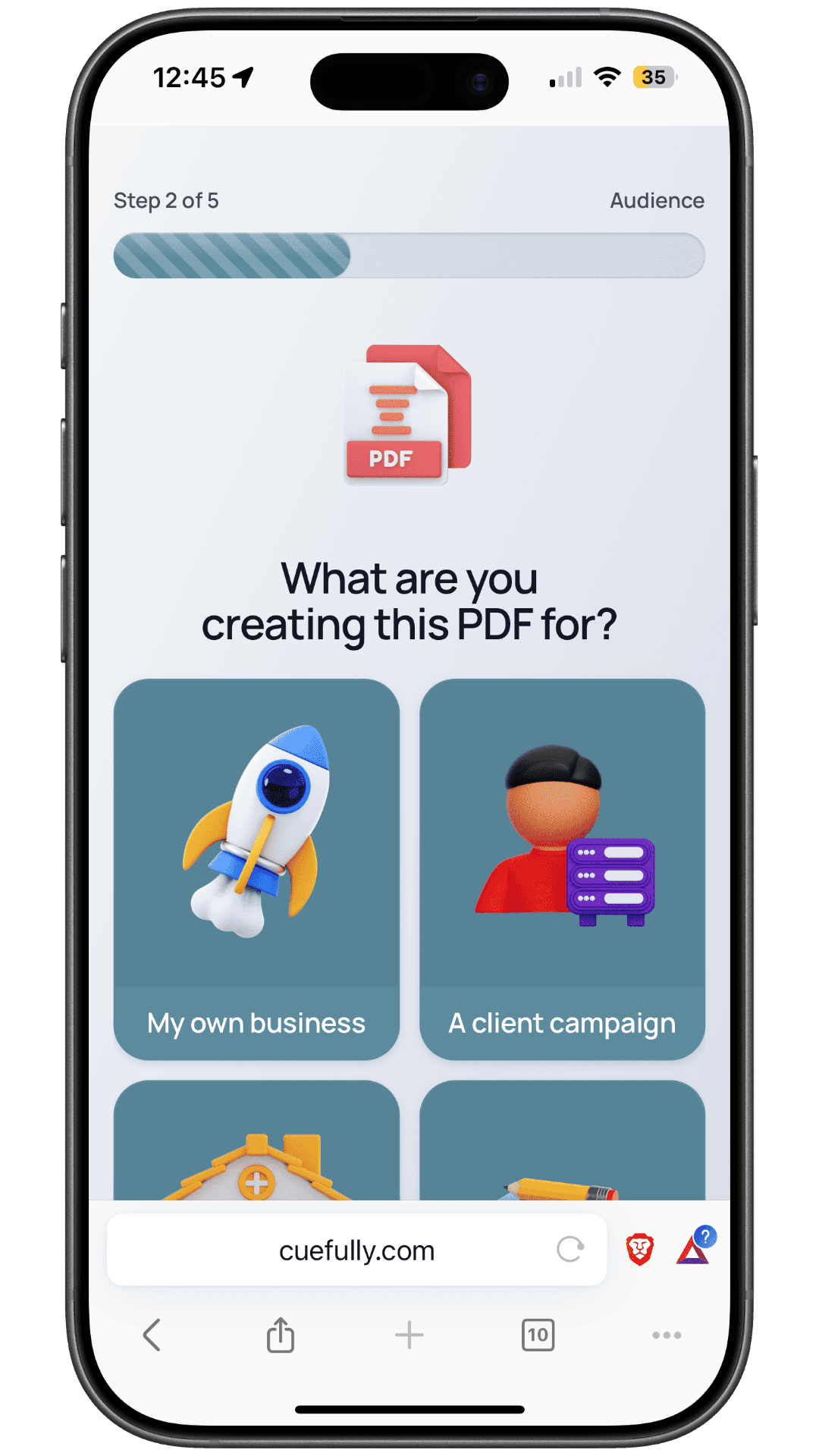
One question, four tappable options, a progress indicator, no keyboard. This is the unit a quiz funnel is built from — the step above is from our lead magnet template, which uses the same mechanic.
What does a live quiz funnel look like?
Two published examples, built for different traffic.
B2B: qualify on deal value, then offer the calendar
Our appointment booking template is a quiz funnel with a calendar at the end. It's set up as a LinkedIn Pipeline Audit, and the order of its screens is the whole argument:
| Screen | What it asks | Why it's there |
|---|---|---|
| 1 | The offer — a free pipeline audit, with what it uncovers | Frames a concrete outcome, not "book a call" |
| 2 | What's your main goal right now? | Easy opener, one tap, no keyboard |
| 3 | What best describes your current situation? | Segments the advice and the follow-up |
| 4 | What is the average value of a new client or customer? | The disqualifier. Deal size decides who gets a slot |
| 5 | Which role best describes you? | Decision-maker or not |
| 6 | How soon do you want to improve this? | Urgency — separates buyers from browsers |
| 7 | "Your audit is ready to request" | The result, earned by answering |
| 8 | Where should we send it? | The only typing in the funnel |
| 9 | Pick a time — addressed to them by name | Calendar, in-funnel, personalised from their answer |
| 10 | Booked, with what happens next | Confirmation |
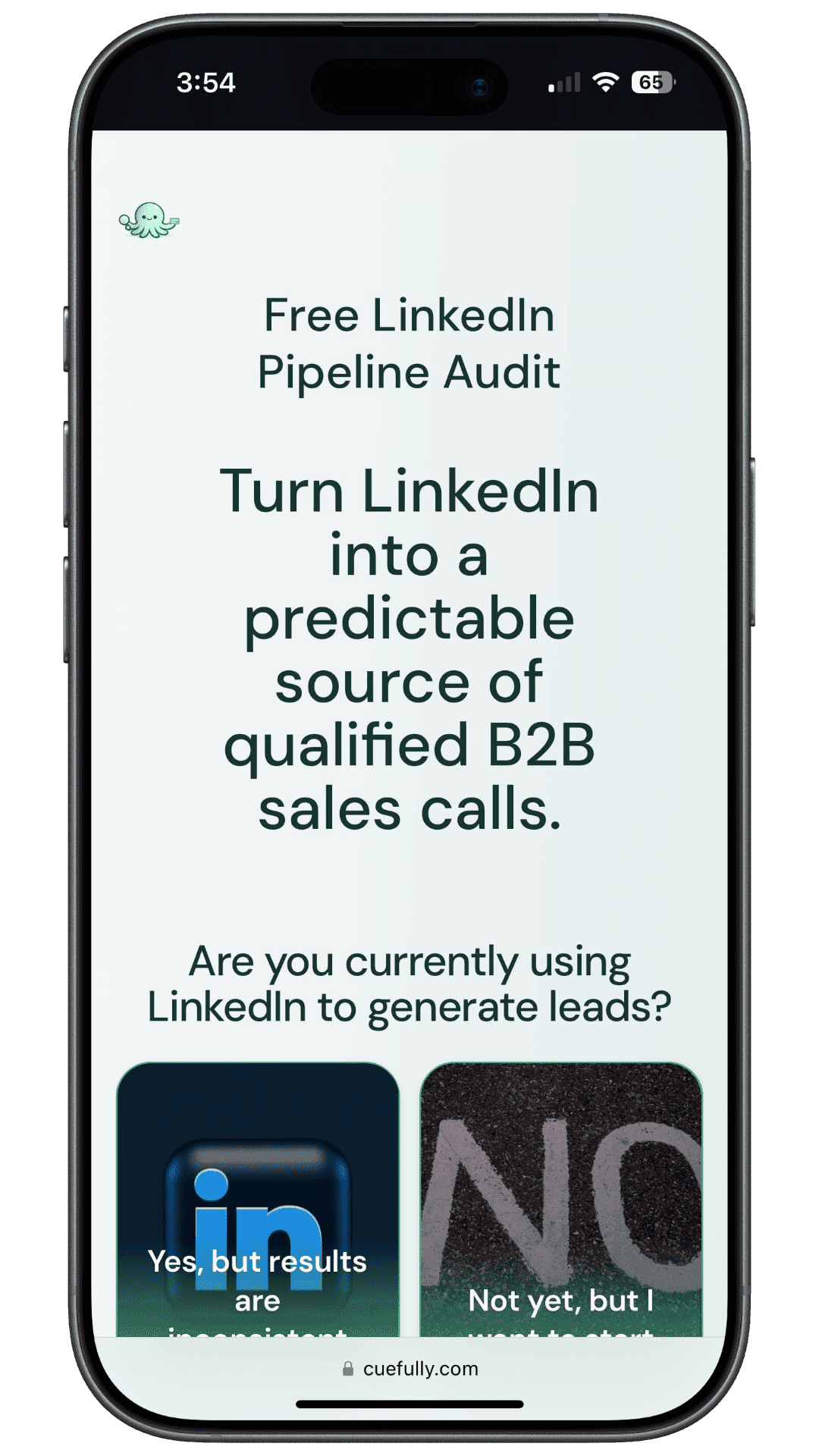
Screen 4 is the one that pays for the funnel. Asking the average value of a new client, before the calendar is ever shown, is what stops a £500-a-month prospect taking a slot built for a £50,000 one. It's a single tap for the visitor and it's the difference between a full calendar and a profitable one.
Screen 9 is worth noting too: the booking step addresses the visitor by the name they gave two screens earlier. Personalisation from the visitor's own answers is what makes a ten-screen flow feel like a conversation rather than an interrogation.
B2C and apps: quiz to app install
Our fitness funnel template is the consumer version, and it's built for the web-to-app pattern: a Meta or TikTok ad, a quiz that builds a personalised plan, then the app download. The visitor answers with taps — current body type, target body, goal, habits — sees the plan that their answers produced, and hands over an email to get it.
It runs to 20 steps, which sounds like far too many until you measure it:
| Measurement | Result |
|---|---|
| HTML document | 88 KB |
| Time to first byte | 0.40–0.66s |
| Total load, median (range) | 0.66s (0.46–0.90s) |
Why does it matter that the funnel feels like an app?
Because the visitor came from an app. They tapped your ad inside Instagram or TikTok — a full-screen, gesture-driven, instant interface — and whatever loads next is judged against that, not against other websites. A quiz that arrives as a web page with a form on it announces the switch. A quiz that arrives as a sequence of full-screen states that respond to a thumb does not.
This is the part most "quiz vs form" comparisons miss. Putting questions on separate screens is the easy half. The half that decides whether someone finishes is what each screen feels like to use:
| What the visitor does | What it takes to feel app-like |
|---|---|
| Answers a question | Taps an image tile or a card, never a radio button and a Next button |
| Gives a number | Drags a slider with a figure that updates live, or a big-digit keypad — not a text field |
| Waits for a result | A short analysis screen that names what's being worked out, the way an app does |
| Sees their outcome | A projected curve or comparison drawn from their own answers |
| Books a time | A calendar inside the flow, not a redirect to a scheduling page |
| Goes back | The browser's back button steps back one screen instead of dumping them out |
| Reads anything | Copy that uses their earlier answers, so the screen is about them |
Every row there is a brick in CueFully — choice and multi-choice tiles, a range slider, a big-digit unit input, an analysis loader, a projection graph, an in-funnel appointment step, and personalisation tokens that print an earlier answer into later copy. A funnel assembled from those doesn't read as a form with better styling. It reads as a small app that happens to live at a URL.
Why a form builder can't produce this
Not because form builders are bad — because they're built around a different object. Typeform and Jotform are excellent at collecting answers, and Typeform's one-question-at-a-time format was doing single-screen questions long before it was a category. But the thing they produce is a document: labelled fields, typed answers, a submit button at the end. The mechanics above aren't styling choices you can reach by configuring a form. There's no live-updating slider that changes a projection, no analysis screen, no calendar step that only qualified answers unlock, no per-client theme applied across the whole flow.
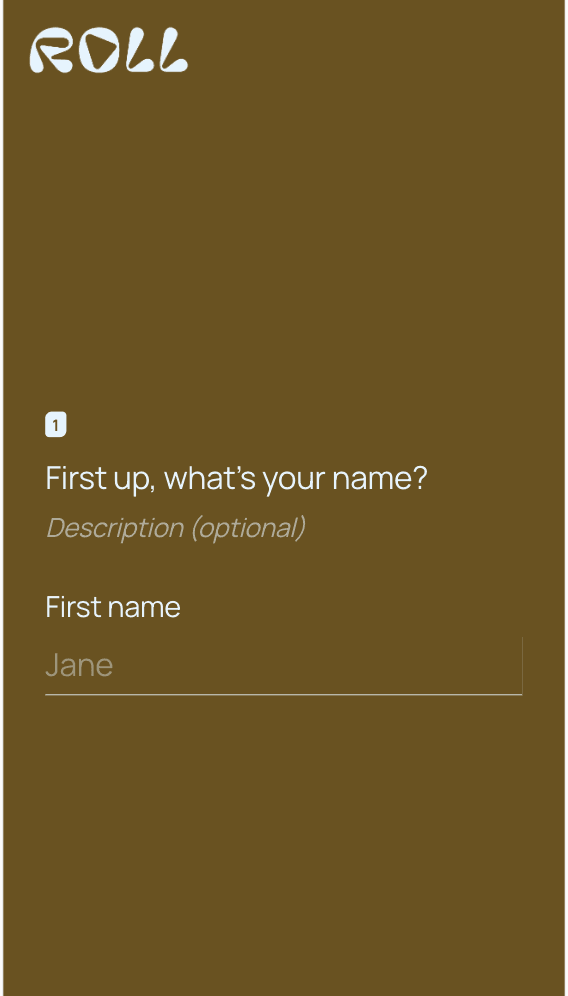
One question per screen, answered by typing. Compare that with the tap-to-answer step earlier in this article: same idea, different amount of work asked of the visitor.
What we won't claim is a conversion multiplier. No one has published a study comparing app-like funnels against forms that survives a source check, and the figures that circulate cite nothing. What we can say is what changes for the visitor: fewer keyboards, fewer decisions per screen, and a document light enough to arrive before they've scrolled back to their feed — 88 KB and 0.66 seconds for the 20-step example above.
What kind of quiz funnel should you build?
Six shapes cover most cases. The mechanism is identical; the result is what changes.
| Quiz type | The result | Fits |
|---|---|---|
| Recommendation quiz | Which product, plan or service fits | Ecommerce, SaaS, agencies with tiered offers |
| Assessment or scorecard | A score with an interpretation | Consultants, coaches, B2B services |
| Plan builder | A personalised plan or programme | Fitness, nutrition, coaching, education |
| Valuation or estimate | A number specific to them | Property, automotive, home services, insurance |
| Eligibility checker | Whether they qualify, and for what | Finance, legal, healthcare, grants |
| Diagnostic | What's wrong and what to do | Agencies, technical services, audits |
| App onboarding (web-to-app) | A personalised plan or setup waiting in the app | Subscription apps running Meta or TikTok acquisition |
Do quiz funnels convert better than forms?
There is no reliable published figure, and the ones in circulation don't survive a source check. Claims that quizzes convert "86% better" or "700% better" than forms appear across vendor sites without a study, a sample or a date attached. One vendor's pricing page asserts "500% more qualified leads" with nothing behind it.
What is evidenced is narrower, and enough to reason with:
- Forms lose most of the people who see them. Only 45% of people who view a form complete it, and mobile runs five points below desktop at 42% versus 47% (Zuko).
- Most traffic is mobile. Statcounter put mobile at 52.57% of global web traffic in July 2026.
- Paid social converts worst of the paid channels. 2.11% against paid search at 5.4% (Ruler Analytics, 2026).
So the honest claim is about mechanism, not multiplier: a quiz funnel asks for the hard thing later, gives a reason to continue at each step, and collects qualification as a side effect. Whether that beats your current form is a test you can run in a week — and we'd rather you ran it than believed a number nobody can source. Our form abandonment statistics page has the full audit of which figures in this category hold up.
How do you measure a quiz funnel?
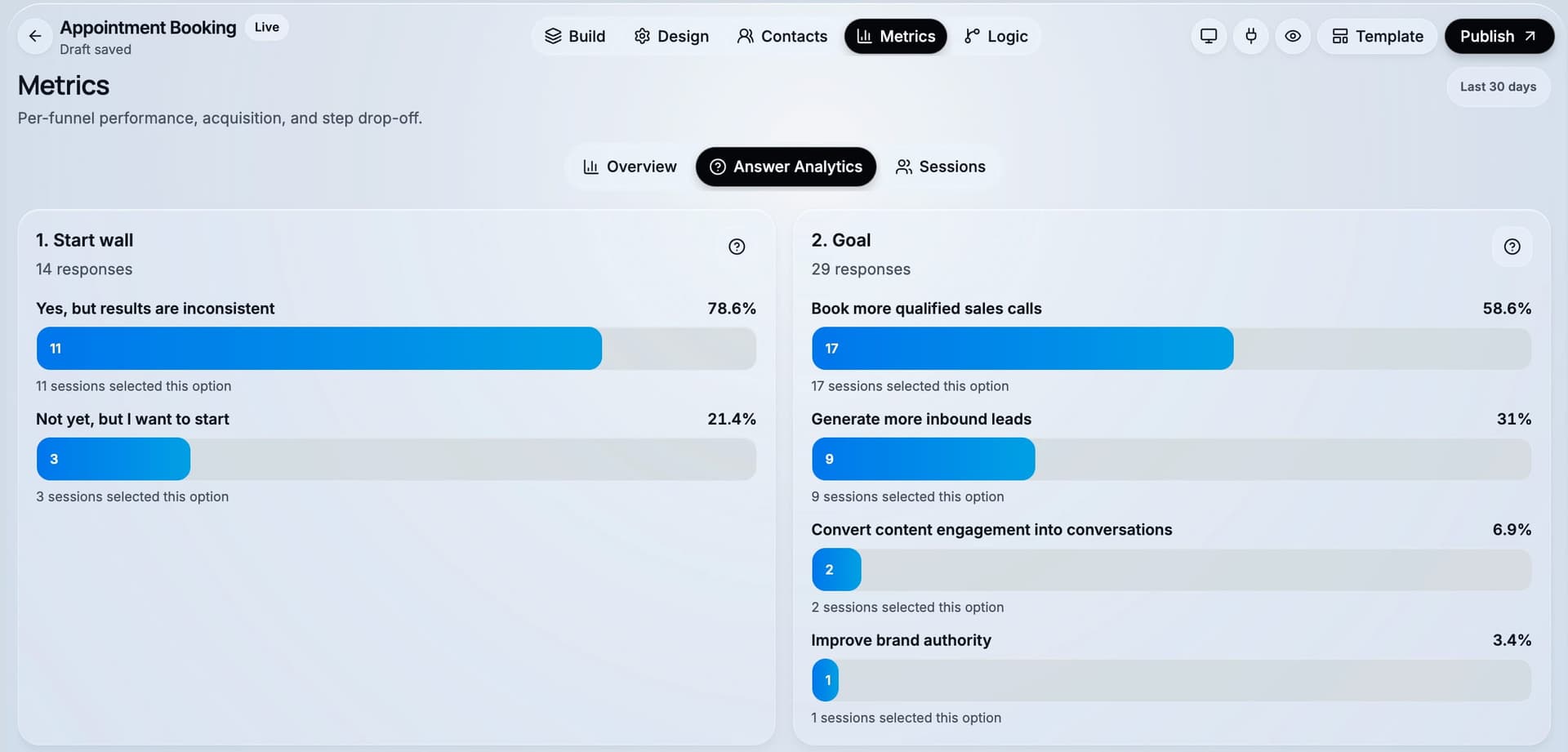
Per step, not per page. The point of a quiz funnel is that it tells you where it lost someone and what they had said before they left.
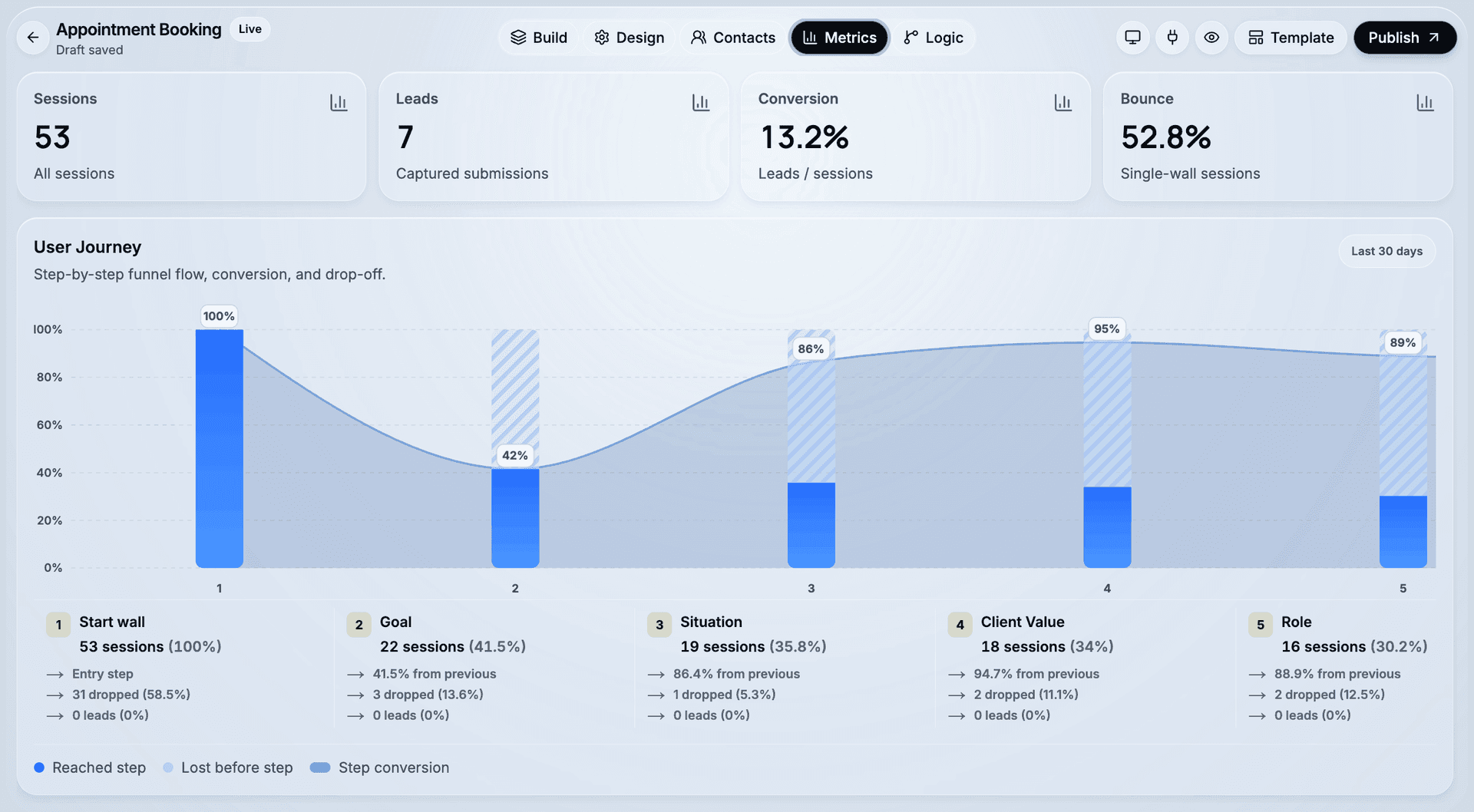
| Metric | What it tells you | What to change |
|---|---|---|
| Start rate | Whether the first question is inviting | Rewrite question 1; make it a single tap |
| Step-by-step drop-off | Which question is too heavy or unclear | Reorder or cut that question |
| Completion to result | Whether the promised result is compelling enough | Strengthen what the result gives them |
| Result to details | Whether the exchange feels fair | Show more of the result before the ask |
| Score distribution | Whether your scoring separates anyone | Re-weight; if everyone qualifies, nothing does |
Answer-level data is the part most teams skip. A question that loses people might be badly worded — or it might be disqualifying exactly the people it should, which is a success wearing the costume of a problem.
What should you build a quiz funnel with?
The requirements are specific: branching on answers, scoring you can route on, a mobile-first renderer, and leads that arrive with their answers attached. A quiz maker that only changes the text on a results page will not do the job.
CueFully is a mobile-first funnel builder designed specifically for Instagram, TikTok and Meta ad campaigns. Funnels ask one question per screen and are answered by tapping rather than typing. Answer options carry points, the running total is available as a condition anywhere in the funnel's logic, and branching sends visitors down different paths based on what they answered. Copy can personalise from the visitor's own earlier answers. Captured leads land in a built-in CRM with their source and every answer attached, and can also go to Slack, Google Sheets or a webhook. Meta Pixel and the Conversions API are configured as a single integration, so campaigns optimise on server-side conversions. Analytics are per step, so you see which question someone left on.
Not for: score-banded report pages with charts, formula-based scoring, or product-recommendation catalogues. If the personalised report itself is the product you're selling, a dedicated assessment tool will serve you better.
Start from the appointment booking template if the funnel should end in a booked call — it already asks the deal-value question that keeps the wrong meetings off your calendar. Use the fitness funnel template for the consumer plan-builder shape, including web-to-app acquisition, or the lead magnet funnel template if your result is a fixed resource with qualifying questions around it. If the quiz is the capture step for your articles, content marketing lead generation covers where it fits in the wider programme.
Frequently asked questions
What is a quiz funnel? A quiz funnel is a multi-step lead generation flow that asks a visitor several questions, branches or scores on their answers, and asks for contact details at the end in exchange for a personalised result. The answers both personalise the result and qualify the lead, so qualification happens as part of delivering value rather than as a separate step.
How is a quiz funnel different from a quiz? A quiz ends at a result. A quiz funnel uses the result as the exchange point for contact details and then routes the visitor by what they answered — qualified leads to a booking or offer, everyone else to a follow-up path. If nothing changes based on the answers, it's a quiz.
How many questions should a quiz funnel have? Enough to personalise the result and decide fit, which is usually three to seven. Length matters less than effort per screen: our published fitness quiz funnel runs 20 steps and loads in 0.66 seconds because each step is a single tap.
Do quiz funnels convert better than forms? There's no reliable published study, and the circulating figures — from "86% higher" to "700% higher" — cite no source. What's evidenced is that forms lose 55% of people between view and completion and perform five points worse on mobile (Zuko), and that a quiz funnel defers the hardest ask to the end. Test it against your current form on the same traffic.
How does lead scoring work in a quiz funnel? Answer options carry points, and the funnel keeps a running total as the visitor answers. That total is used as a condition — for example, visitors above a threshold are offered a booking step and everyone else receives their result and a nurture path. In CueFully the total is recalculated from the answers at every step, so going back and changing an answer corrects the score instead of double-counting it.
What types of businesses do quiz funnels work for? Any business where the right answer depends on the buyer: assessments and audits for B2B services that sell through a booked call, recommendation quizzes for ecommerce and tiered services, plan builders for coaching and fitness, web-to-app quizzes for subscription apps running Meta or TikTok acquisition, valuations for property and automotive, eligibility checkers for finance and healthcare, and diagnostics for agencies. The common thread is that a one-size answer would be worse than a personalised one.
Can you build a quiz funnel without code? Yes. The whole build is visual — steps are added on a canvas, options carry points set in the inspector, branching is configured per answer, and publishing is one action. Starting from a published template cuts it down further.
Sources and method
- Zuko — form completion by device, and the stated conclusion on field count. Aggregated from Zuko's customer base of live web forms; no sample size published.
- Statcounter — device share of global web traffic, July 2026.
- Ruler Analytics — conversion rate by channel, 2026, whole-site sessions, conversion defined as a qualified lead or sale.
- CueFully fitness funnel template — measured 17 September 2026, iPhone Safari user agent, HTML document only, 10 runs, no cache.
- CueFully appointment booking template — measured 18 September 2026, same method and user agent, 10 runs. Screen order taken from the published funnel.
- Quiz-versus-form lift claims — checked and not reproduced. No source located for the "86%", "700%" or "500%" figures in circulation.
Want to see a quiz funnel before you build one? Take the appointment booking template on your phone — answer the deal-value question and watch where it sends you — then start free with CueFully.
Build from the guide
Start with the Appointment Booking template
Start from a proven mobile-first flow, customize it for your client, and publish a funnel that captures qualified leads without adding developer work.