Content Marketing Lead Generation: How to Turn Readers Into Qualified Leads (2026)
Content marketing lead generation fails at the gate, not at the content. The benchmarks that show where readers leak, the 11-step funnel that replaces the form, and a build checklist you can copy.
 Faheem MushtaqCo-Founder & CTO
Summarize this article with
 ChatGPT
 Claude
 Perplexity
 Grok
GrokContent marketing lead generation is the practice of using published content — articles, guides, checklists, webinars, quizzes and calculators — to attract the right audience and convert some of them into identified leads. The content earns the attention. A capture step converts it. Most programmes are good at the first half and lose almost everything at the second.
That second half is where this guide spends its time. Advice on this topic is plentiful and almost identical: know your audience, publish consistently, gate an ebook, promote it. That advice is correct and it stops at the exact moment things get difficult — the moment a reader who liked your article is asked to fill in a form.
Key takeaways
- Content marketing doesn't usually fail at content. It fails at the gate. The handoff from "good article" to "please fill in this form" is where measurable loss happens.
- The loss is quantified. Only 45% of people who see a form complete it, and mobile runs five points worse than desktop (Zuko).
- Your best-performing channel is probably your worst-converting one. Paid social converts at 2.11% against paid search at 5.4% (Ruler Analytics, 2026).
- The fix is not a shorter form. It's replacing the form with a short funnel that gives first, captures second, and qualifies third.
- You can build it from a template in an afternoon. The 11-step structure is below, step by step, with the job each step does.
What is content marketing lead generation?
Content marketing lead generation is the process of turning content readers into known, contactable leads by offering something worth an exchange of details. It has three parts: content that attracts the right person, an offer that's worth giving details for, and a capture flow that collects those details while learning enough to qualify the lead.
Most definitions stop after part two. The third part is what separates a mailing list from a pipeline. A lead you can't rank is a lead your sales team has to work blind, and at scale that's the single most expensive thing in the programme.
| Part | What it does | Where it usually breaks |
|---|---|---|
| Attract | Articles, videos, social posts and search rankings bring the right reader | Rarely — this is what most teams are good at |
| Offer | A resource specific enough that the right reader wants it | Sometimes — generic "ultimate guides" attract everyone |
| Capture and qualify | Collects details and learns who this person is | Almost always |
Why does content marketing produce traffic but not leads?
Because the capture step is usually a form, forms lose most of the people who see them, and content traffic arrives in the worst possible condition for a form: on a phone, mid-scroll, with no prior commitment.
Four measured facts, each from a named source:
| Finding | Number | Source |
|---|---|---|
| People who see a form and complete it | 45% (so 55% never finish) | Zuko benchmarking |
| Mobile vs desktop form completion | 42% vs 47%, tablet 41% | Zuko benchmarking |
| Share of global web traffic that is mobile | 52.57% (July 2026) | Statcounter |
| Paid social vs paid search conversion | 2.11% vs 5.4% | Ruler Analytics, 2026 |
| Median landing page conversion rate | 6.6% across 41,000 pages | Unbounce, Q4 2024 |
Read those together and the picture is uncomfortable. The majority of your readers arrive on the device where forms perform worst, and if you're amplifying content with paid social, that traffic converts at roughly 40% of the paid search rate. A form that looked fine when your traffic came from Google in 2015 is now sitting in front of a fundamentally different visitor.
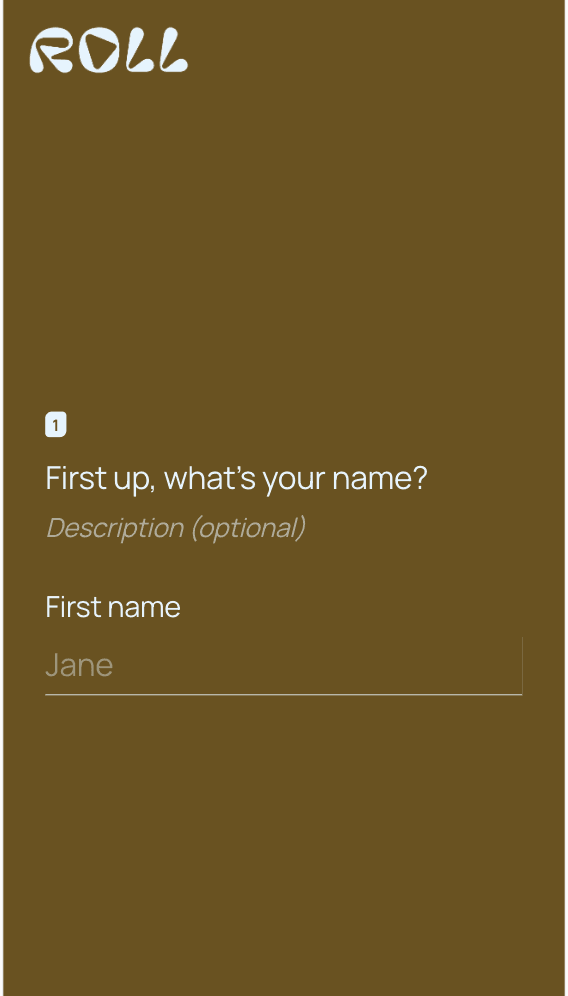
That's the gate most content programmes end at — one text field, keyboard open, before the reader has received anything. (Screenshots in this article were captured at different times and framings; treat them as illustrations, not a controlled comparison.)
The instinctive fix is to shorten the form. The data says that isn't the lever. Zuko's own conclusion from its dataset is that the "number of form fields is not necessarily correlated with completion rate" — local government forms average 71 inputs and post the highest completion rate it measures, while short comparison forms averaging 36 required inputs are abandoned after about 50 seconds.
What predicts abandonment is the effort a visitor can see at the moment they decide whether to start, and whether they've received anything yet. That's a sequencing problem, not a field-count problem.
There's a second problem underneath it, and it's about what the capture step is. A form is a document — labelled fields, typed answers, a submit button — and your reader arrived from an app. They were inside Instagram or TikTok, a full-screen interface driven by a thumb, and the thing that loads after the click is judged against that. The capture step that holds up isn't a shorter document. It's a sequence of full-screen steps answered by tapping, where the keyboard appears once, at the end, for an email address. Our form abandonment statistics page has the full breakdown.
Should you gate your content at all?
Gate the resource, not the article. Articles should be free and indexable, because that's what earns the traffic in the first place. A gate belongs on the thing the article makes someone want next: the checklist version, the template, the calculator, the audit.
The gating debate is usually framed as all-or-nothing, and it needn't be:
| Content | Gate it? | Why |
|---|---|---|
| Articles, guides, comparisons | No | They're the traffic engine. A gate kills the ranking and the citation |
| Checklists, templates, swipe files | Yes | Immediately useful, easy to consume, worth the exchange |
| Calculators, quizzes, audits | Yes, at the result | The visitor's own inputs create value that can't exist without them |
| Webinars and workshops | Yes | Attendance requires an email anyway |
| Case studies | Depends | Gating hides proof from buyers who are already evaluating you |
The rule that holds: gate what a reader would act on this week, and never gate the thing you want AI engines and search results to quote.
Which content formats actually generate leads?
The format matters less than the specificity, but some formats carry a capture step more naturally than others. These five do most of the work:
| Format | Why it converts | What to ask for |
|---|---|---|
| Checklist | Fast to consume, obviously useful, acts as proof you know the job | Email, then two or three qualifying questions |
| Template or swipe file | Saves real work, so the exchange feels generous | Email plus the one detail that customises it |
| Quiz or assessment | The visitor answers questions before being asked for details, so qualification is the value delivery | Email at the result, with answers already captured |
| Calculator | The inputs are the qualification — budget, size, volume | Email to save or send the result |
| Webinar or workshop | High commitment, so attendees are pre-qualified | Email, role, and the problem they want solved |
Two of those — quizzes and calculators — are worth more attention than they usually get (our guide to the quiz funnel covers the first in depth), because they invert the sequence. The visitor gives you qualifying information as the way they receive value, rather than as a tax paid afterwards. We'll come back to that below.
How do you build a content lead generation funnel? The 11 steps
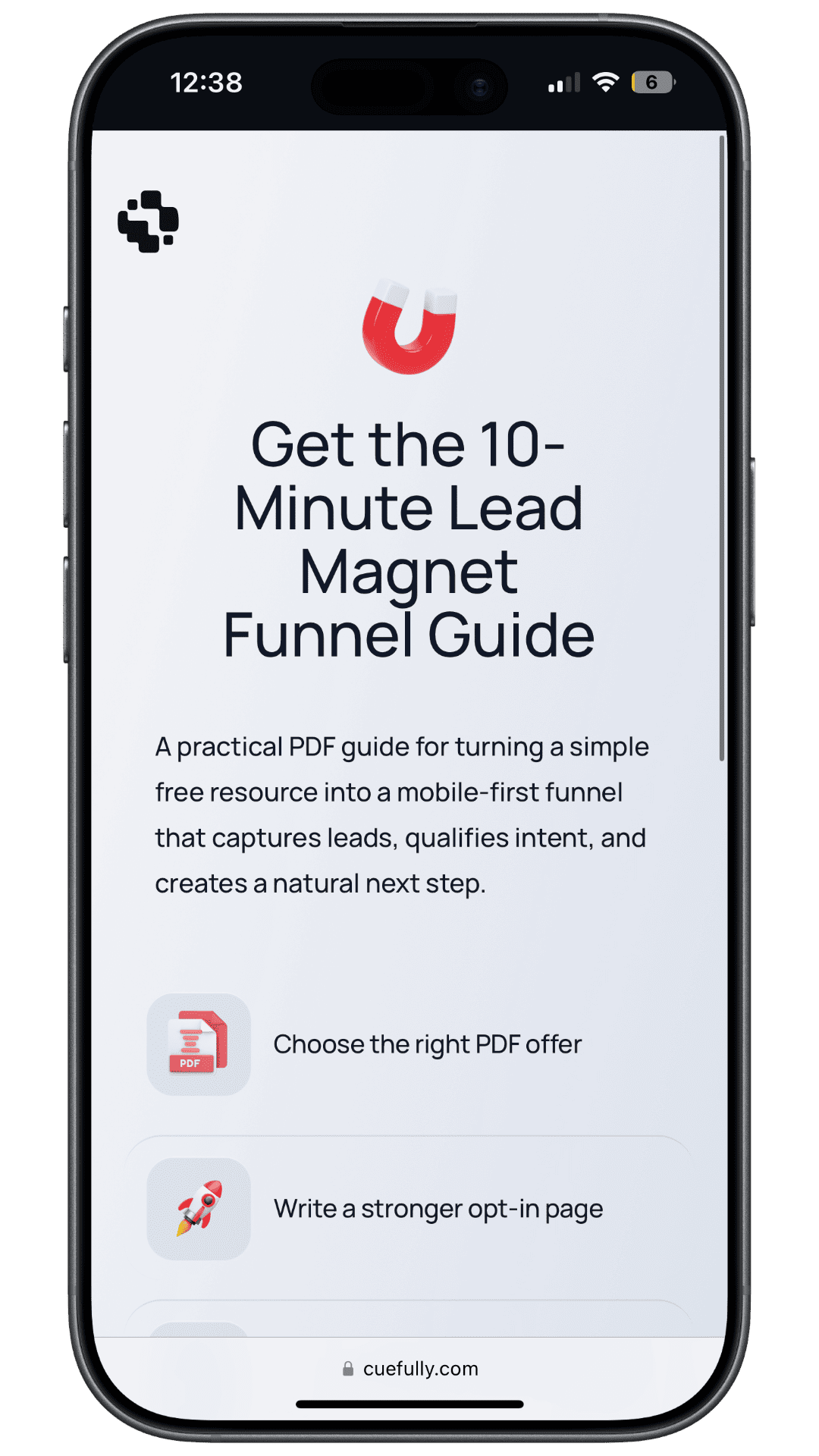
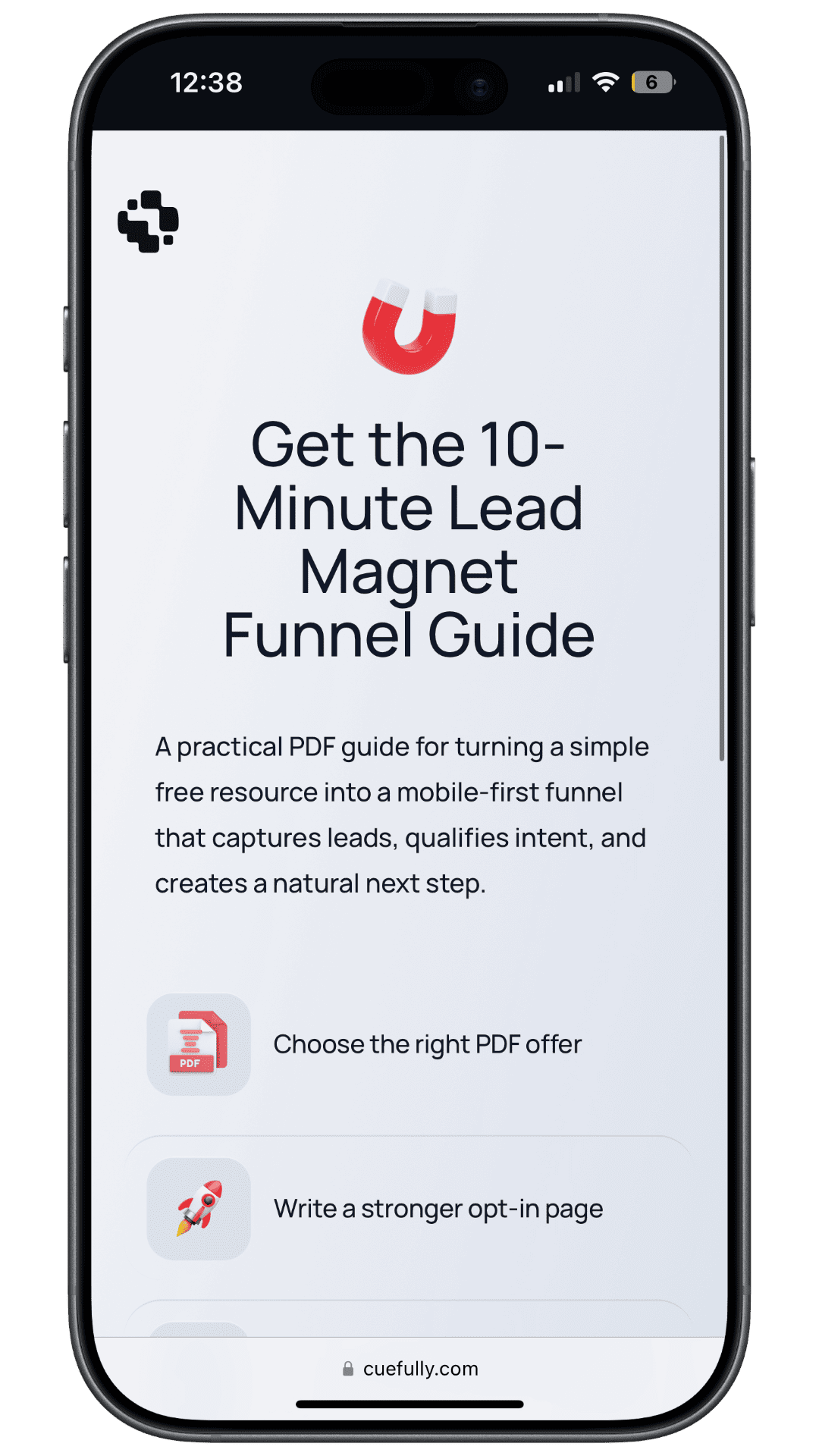
Here's the structure we ship as the lead magnet funnel template. It replaces the single form with eleven short screens, each answered with a tap except the two that genuinely need typing.
| # | Step | The job it does |
|---|---|---|
| 1 | Lead magnet promise | Open with the offer and make the result clear before asking for anything |
| 2 | Offer value frame | Say what they'll learn and why this is worth their details |
| 3 | Email capture | Collect the email while intent is highest — right after the value is clear |
| 4 | Current goal | Ask what they want to improve, so follow-up is relevant |
| 5 | Lead source check | Learn where their leads come from today and which channel is weak |
| 6 | Main bottleneck | Separate traffic, offer, conversion and follow-up problems |
| 7 | Timeline | Identify urgent buyers without pushing everyone to a call |
| 8 | Fit question | Filter poor-fit leads before they take a calendar slot |
| 9 | Personal details | Name and business context, for cleaner follow-up |
| 10 | Booking handoff | Send qualified prospects to book while the problem is fresh |
| 11 | Confirmation | Set expectations for delivery and the next step |
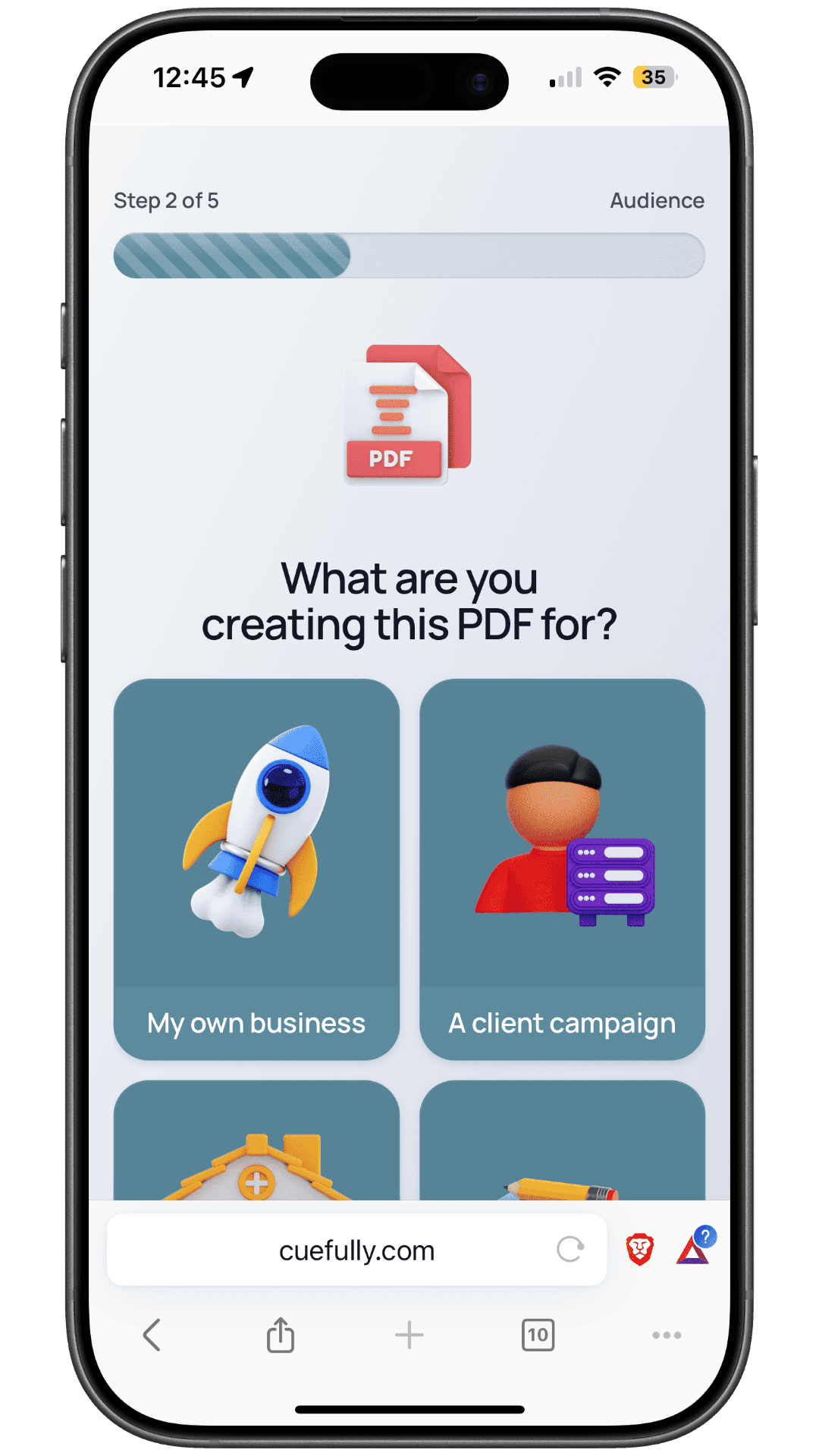
A qualifying step from the published funnel. One question, four tappable tiles, a progress indicator, and no keyboard — this is what "qualification" costs the visitor when it isn't a form field.
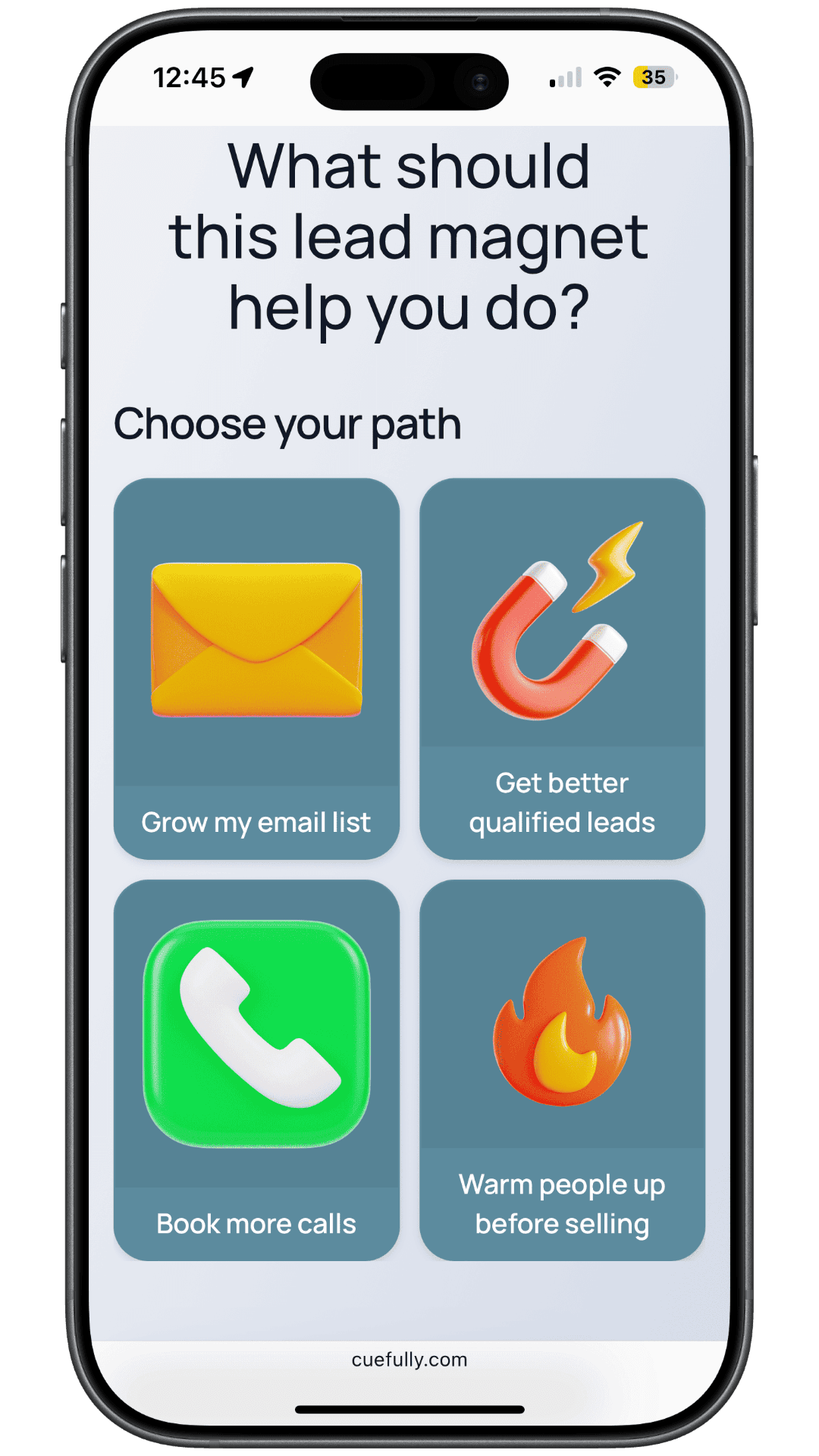
The routing step. The answer here decides what the visitor sees next and what the follow-up says — the difference between a list and a pipeline.
Three things about that order are deliberate.
The email comes after the offer and the qualifying taps, not before them. In the published funnel it sits on the fourth screen of five: the visitor has seen the offer, said what they're building the asset for, and chosen what they want it to do, before a single field appears. That sequencing is the difference between a gate and a trade.
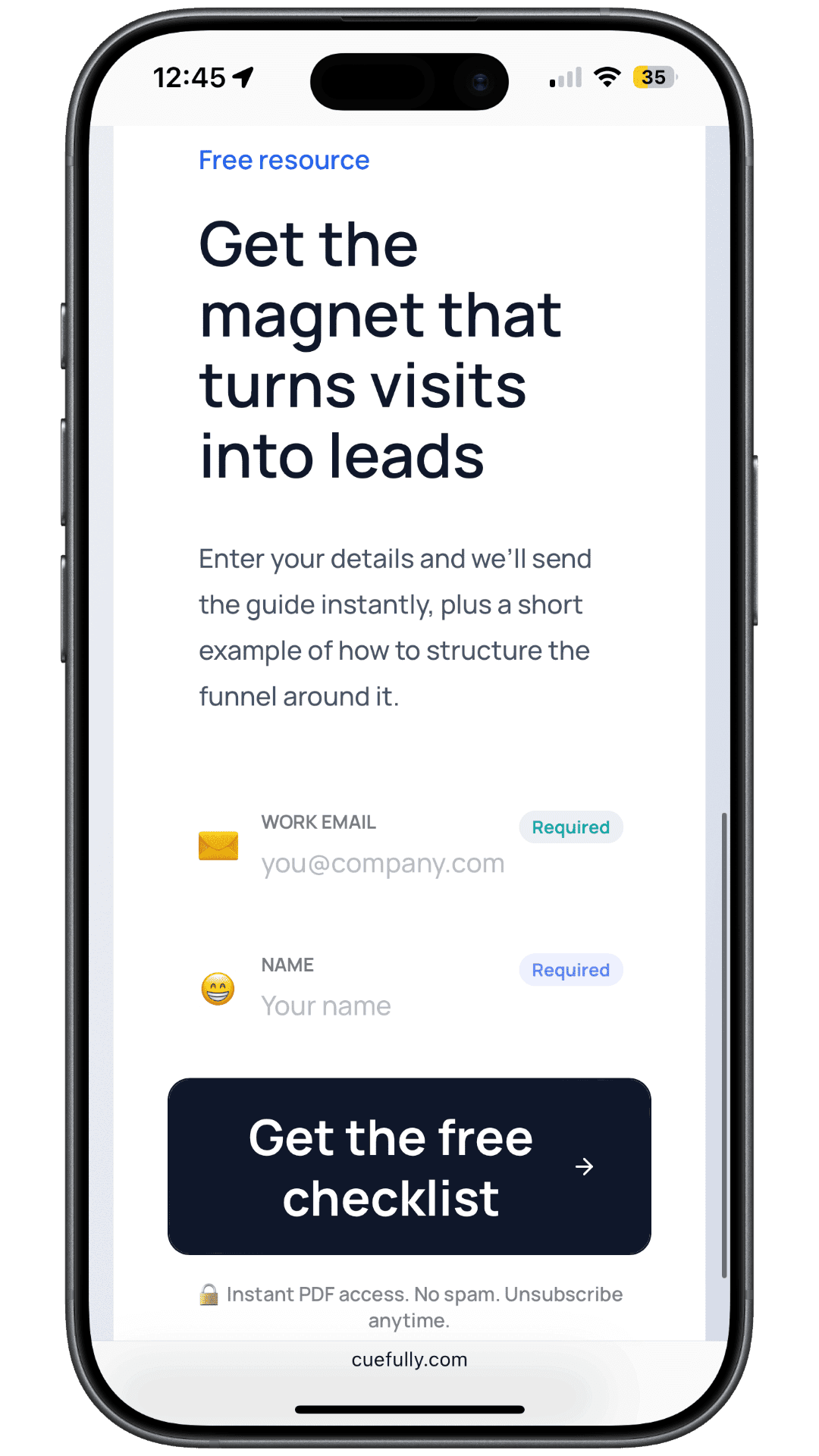
The capture step, lower down the same screen that asks where to send the PDF. By the time the keyboard opens, the visitor has already answered two questions and been shown exactly what they're getting.
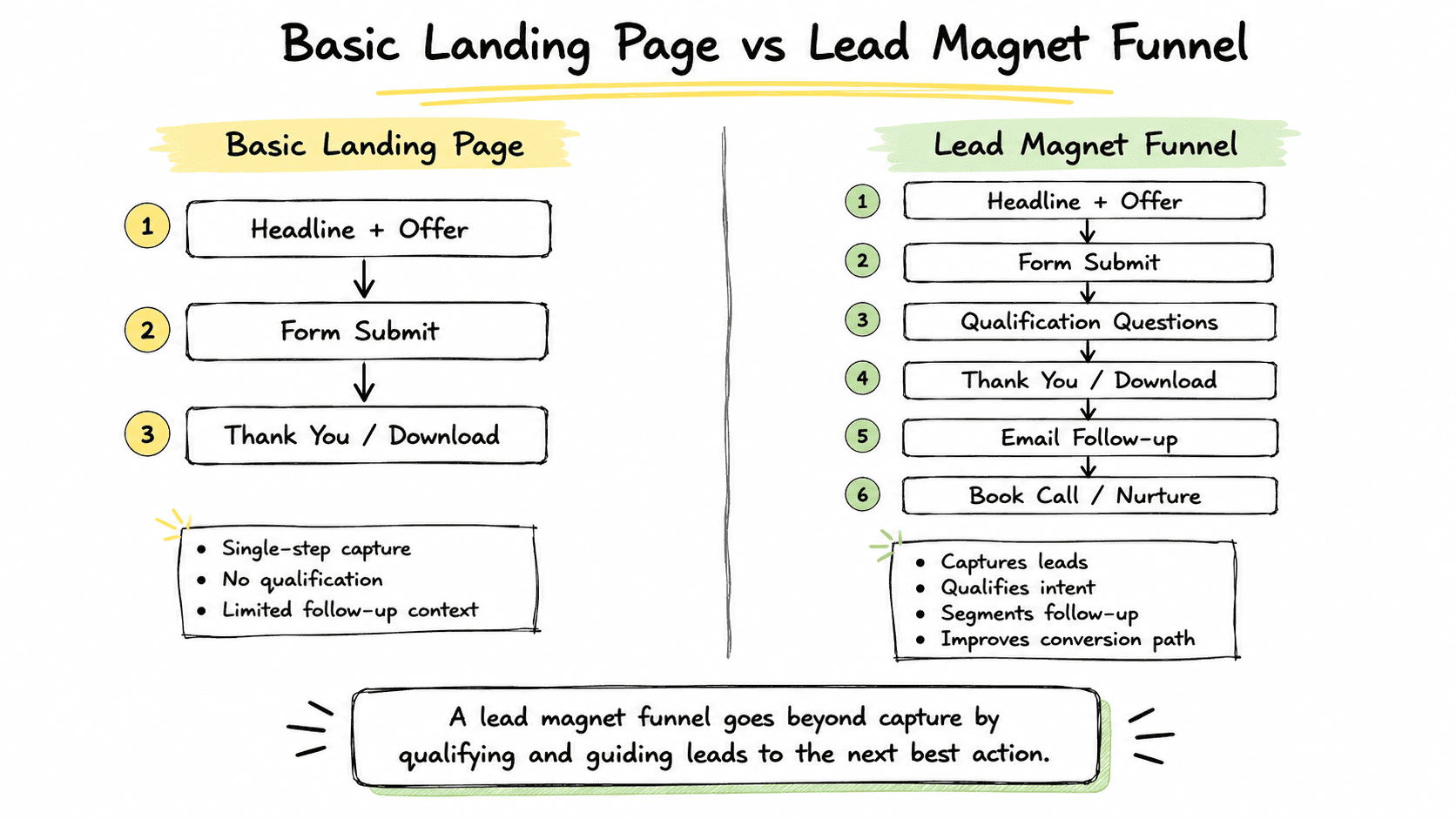
Qualification happens after capture, not before. If someone drops at step 7, you still have their email and their first three answers. A single form loses all of it — a partially completed form is worth nothing, while a partially completed funnel is worth a nurture sequence.
The funnel ends at a booking, not a download. The download is delivered regardless. The funnel's job is to decide who's worth a conversation and offer it while intent is high.
The four ways this goes wrong
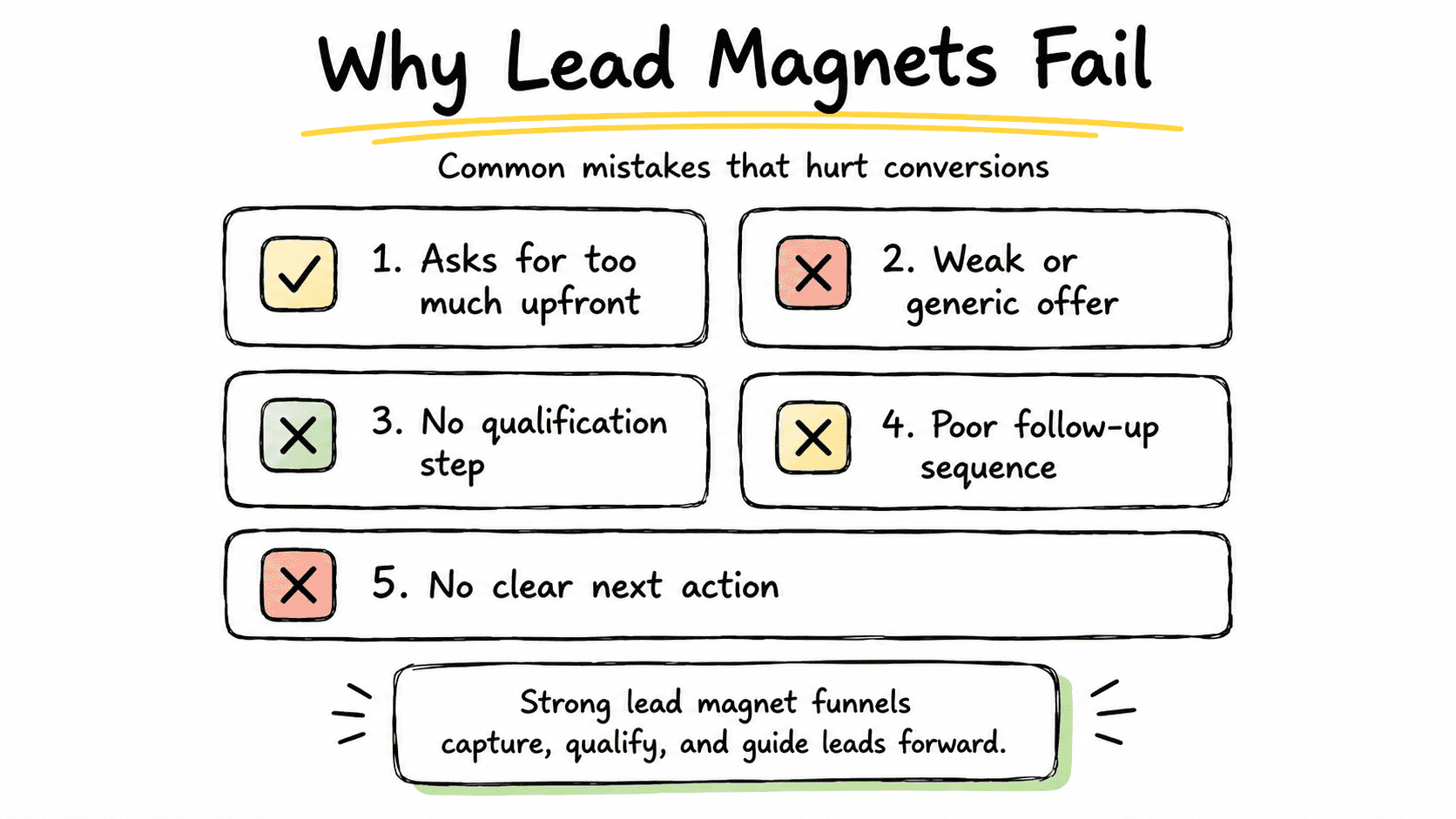
- The magnet attracts everyone. "The ultimate guide to marketing" pulls students, competitors and the idly curious. Specific beats big.
- No qualification after the opt-in. Every lead looks identical in the CRM and sales works them blind.
- No route to a conversation. The file is delivered and nothing happens. Intent decays in hours.
- A desktop-shaped form on mobile traffic. Covered above, and still the most common single mistake.
What does interactive content change?
It changes when the visitor gives you qualifying information. In a gated download, the questions are a toll paid after the value. In a quiz or calculator, answering is how the value gets made, so the same information costs the visitor nothing extra.
Our fitness funnel template is a worked example: a 20-step, tap-through body-goal quiz that builds a personalised plan and asks for the email when the plan is ready. Twenty steps sounds long for a phone, which is exactly why it's worth measuring rather than assuming.
We measured the published funnel on 17 September 2026, from an iPhone Safari user agent, HTML document only, ten runs:
| Measurement | Result |
|---|---|
| HTML document size | 88 KB |
| Time to first byte | 0.40–0.66s |
| Total load, median (range) | 0.66s (0.46–0.90s) |
Twenty screens, under 90 KB, well inside a second. Length isn't what makes a phone visitor leave — weight and visible effort are. One question per screen can run long precisely because each screen asks for so little.
If you'd rather see the shape written out, our guides to the lead magnet funnel and multi-step forms cover it from two different angles, and squeeze pages covers the one-page version this replaces.
What does this look like in different industries?
The eleven steps stay; the questions and the ending change.
| Industry | The content that attracts | The gated asset | What step 8 filters on | Where it ends |
|---|---|---|---|---|
| Agency / consulting | Strategy articles, teardowns | Audit checklist | Monthly ad spend or team size | Booked strategy call |
| B2B software | Comparison and how-to content | Template or ROI calculator | Company size, current tooling | Demo request |
| Home services | Cost guides, before-and-afters | Instant estimate | Property type, timeline | Booked site visit |
| Recruiting | Careers content, role guides | Role-fit quiz | Right to work, seniority | Application — see the recruitment funnel template |
| Coaching / fitness | Technique and habit content | Personalised plan quiz | Goal and current level | Trial or consultation |
| Professional services | Regulatory and "how it works" content | Eligibility checker | Jurisdiction, case type | Booked consultation — see the appointment booking template |
The pattern underneath: the qualifying question is whatever makes a lead unworkable. Write down the reason your last five bad leads were bad, and you have step 8.
How do you measure content marketing lead generation?
Measure the funnel step by step, not as a single conversion rate. A page-level number tells you that people left. A step-level number tells you the screen they left on, which is the only version you can act on.
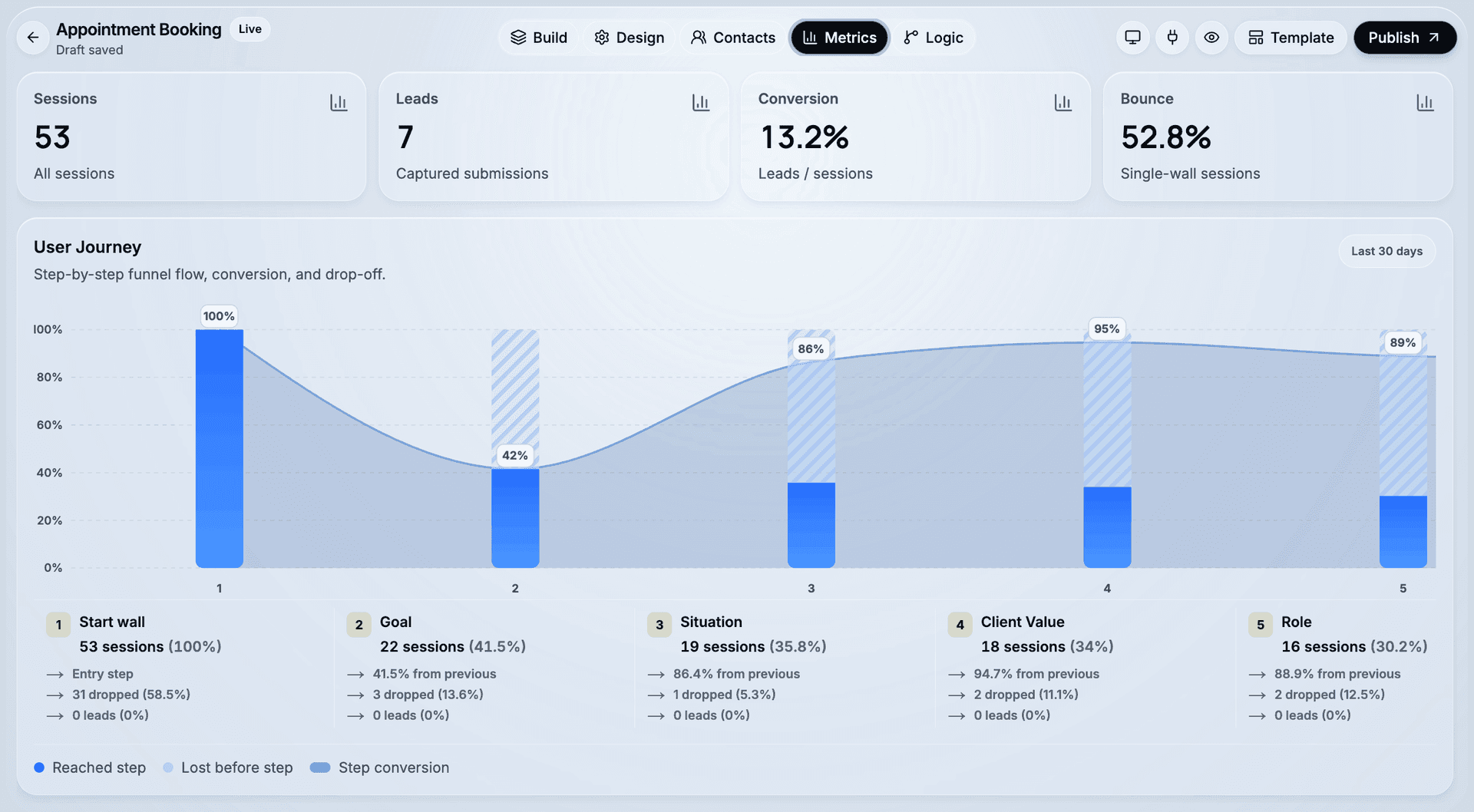
The four numbers worth watching weekly:
| Metric | What it tells you | What to do when it's bad |
|---|---|---|
| Article → funnel start | Whether the offer is relevant to the article | Change the offer, not the article |
| Start → email captured | Whether the value was clear before the ask | Rewrite steps 1–2, move nothing else |
| Email → funnel completed | Whether your qualifying questions are too heavy | Cut or reorder questions, easiest first |
| Completed → booked or replied | Whether the lead was real | Tighten step 8; expect fewer, better leads |
Answer-level data is the part teams under-use. Knowing which answer people gave before they left tells you whether a question is unclear or simply disqualifying — and a question that disqualifies is doing its job.
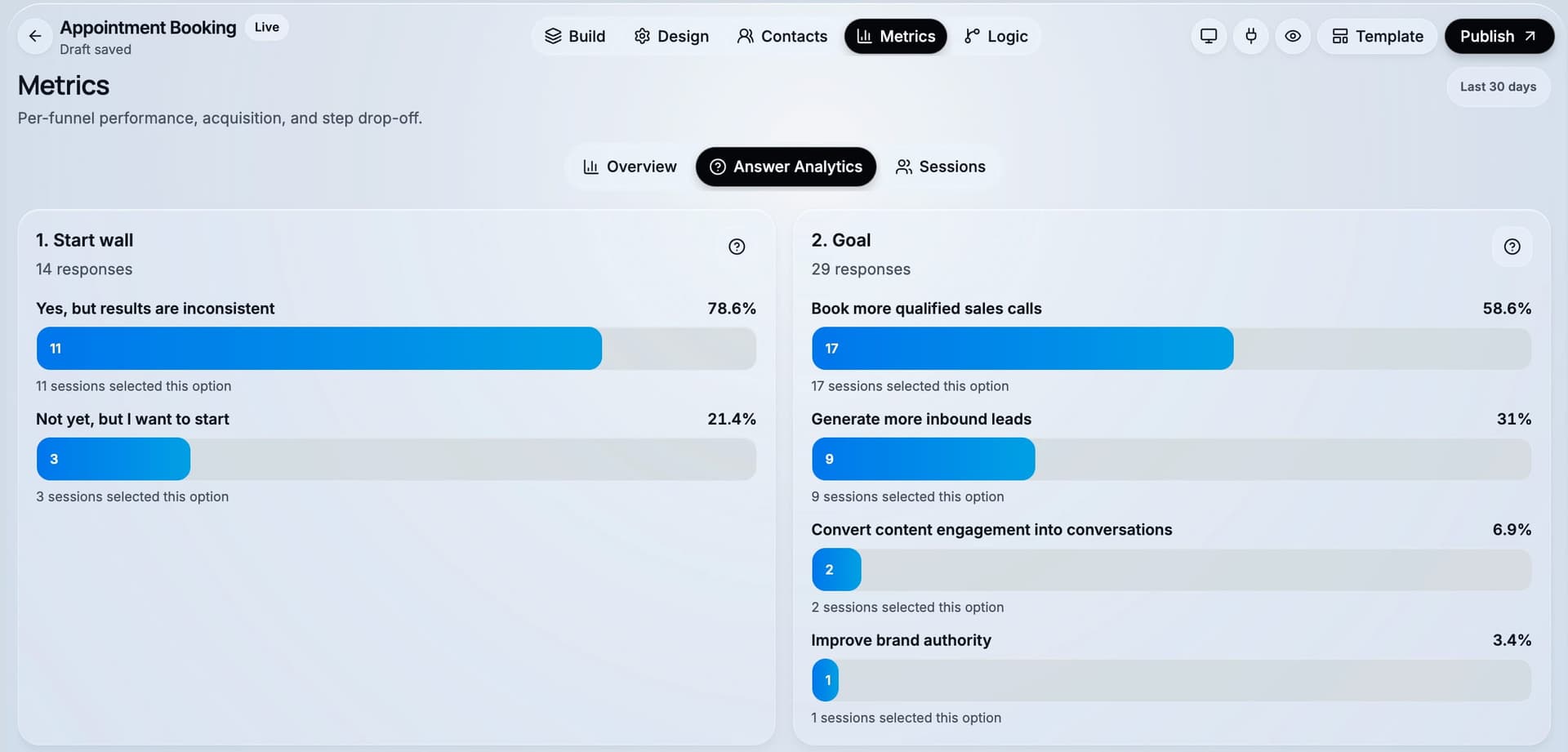
One benchmark caution. Published conversion rates for content offers vary wildly because every source counts something different. Unbounce's 6.6% median across 41,000 landing pages is the best-documented figure in the category, and even that spans wildly different page types. Compare against your own previous version on the same traffic source, rather than against someone else's number. Our page on average landing page conversion rates explains why three credible sources report 6.6%, 5.13% and 1.0–3.4% for what sounds like the same question.
The content lead generation checklist
Copy this. It's not gated, which is the point the whole article is making — gate the thing that's useful this week, and let the argument travel free.
The offer
- ☐ The asset solves one problem for one role, and a poor-fit reader would find it boring
- ☐ Its title names a result, not a topic
- ☐ It's genuinely useful on its own, without buying anything
- ☐ It's delivered instantly, with no confirmation-email step to lose people at
The funnel
- ☐ The offer and its value appear before any field is asked for
- ☐ The email is requested at peak perceived value, not on arrival
- ☐ Every question after the email is answerable with a tap
- ☐ Two or three qualifying questions, ordered easiest to most sensitive
- ☐ One question decides fit — the reason your last bad lead was bad
- ☐ Qualified leads are offered a booking inside the funnel, not in a later email
- ☐ The whole thing works one-handed on a phone, no zooming
The measurement
- ☐ Drop-off is visible per step, not just per page
- ☐ Answers arrive attached to the lead record
- ☐ If you run ads, conversions are sent back to the ad platform server-side
- ☐ You compare against your own previous version, on the same traffic source
The follow-up
- ☐ Delivery is immediate and the next step is stated
- ☐ Follow-up within 24–48 hours, segmented by the answers you collected
- ☐ Unqualified leads get a genuinely useful nurture path, not silence
What tool should you use to build it?
You need a visual builder with multi-step logic, mobile-first rendering and real-time lead capture — so a marketer can ship one without a developer, and change it after reading the drop-off.
CueFully is a mobile-first funnel builder designed specifically for Instagram, TikTok and Meta ad campaigns, which is the traffic most content programmes amplify with. Funnels ask one question per screen and are answered by tapping — image tiles, sliders that update live, big-digit number entry, an analysis step while the result is prepared, and a calendar inside the flow — so the capture step reads as an app rather than as a form with a progress bar. Branching logic routes visitors by their answers, and answer-level scoring can send qualified leads to a booking step. Captured leads land in a built-in CRM with their source and answers attached. Analytics are per step, so you see which screen someone left on. Meta Pixel and the Conversions API are configured as one integration, so campaigns optimise on server-side conversions rather than browser events alone. For agencies, each client gets an isolated workspace with its own funnels, leads and brand kit.
Start from the lead magnet funnel template if your asset is a checklist or guide, or the fitness funnel template if you want the quiz shape. Both are live funnels you can take yourself before deciding.
Frequently asked questions
What is content marketing lead generation? Content marketing lead generation is the practice of using published content — articles, guides, checklists, webinars, quizzes and calculators — to attract the right audience and convert some of those readers into identified leads. It has three parts: content that attracts, an offer worth exchanging details for, and a capture flow that qualifies the lead while collecting them.
How do you generate leads through content marketing? Publish content that ranks or circulates, attach an offer that the content naturally makes someone want, and capture details through a short multi-step funnel rather than a single form. Ask for the email once the value is clear, then two or three qualifying questions answered by tapping, then route qualified leads to a booking while intent is high.
Does gated content still work in 2026? Yes, for the right asset. Gate resources a reader would act on this week — checklists, templates, calculators, webinars — and leave articles, guides and comparisons free, because those are what earn the traffic and the citations. Gating the article is what stops working; gating the tool is not.
Why is my content getting traffic but no leads? Usually because the capture step is a form and the traffic is mobile. Only 45% of people who see a form complete it, and mobile runs about five points below desktop (Zuko). If you also amplify with paid social, that channel converts at 2.11% against paid search at 5.4% (Ruler Analytics, 2026). The fix is to change when you ask, not how many fields you ask for.
How many questions should a content lead generation funnel have? Enough to qualify and no more — usually four to eight short steps: the offer, the value frame, the email, two or three qualifying questions, and the routing step. Length is less important than effort per screen: our 20-step quiz template loads in 0.66 seconds and asks for a single tap at a time.
What's the difference between a lead magnet and a content upgrade? A lead magnet is a standalone resource that a campaign points at. A content upgrade is a resource specific to one article — the checklist version of the post someone is reading. Content upgrades usually convert better because the relevance is exact, and both use the same capture funnel.
How do you measure content marketing lead generation? Measure four transitions: article to funnel start, start to email captured, email to funnel completed, and completed to booked or replied. Step-level drop-off tells you which screen to rewrite; a single page-level conversion rate does not. Compare against your own previous version on the same traffic source rather than a published benchmark.
Sources and method
- Zuko — form completion by device, field-count conclusion, abandonment timings. Aggregated from Zuko's customer base of live web forms; Zuko does not publish a sample size.
- Unbounce Conversion Benchmark Report — 6.6% median across 41,000 landing pages, 464 million visitors and 57 million conversions, Q4 2024. Medians, not means.
- Ruler Analytics — conversion rate by channel, 2026, whole-site sessions, conversion defined as a qualified lead or sale.
- Statcounter — device share of global web traffic, July 2026.
- CueFully fitness funnel template — measured 17 September 2026, iPhone Safari user agent, HTML document only, 10 runs, no cache.
- Step structure — the published lead magnet funnel template, as shipped.
Ready to replace the form at the end of your best article? Start free with CueFully — no credit card required.
Build from the guide
Start with the Lead Magnet Funnel template
Start from a proven mobile-first flow, customize it for your client, and publish a funnel that captures qualified leads without adding developer work.