Typeform vs Jotform: Which Should You Choose? (2026)
A direct comparison of Typeform and Jotform with pricing checked in August 2026, including the volume crossover point where the cheaper option flips.
 Faheem MushtaqCo-Founder & CTO
Summarize this article with
 ChatGPT
 Claude
 Perplexity
 Grok
GrokChoose Typeform if the form is customer-facing and its design reflects on your brand. Choose Jotform if you need volume, document workflows, or compliance features.
That is the short answer, and for most people it settles it. But there is a detail almost every comparison of these two gets wrong: Typeform is not simply the expensive one. At high volume it is cheaper than Jotform. The crossover sits around 10,000 responses a month, and the numbers are below.
One thing to settle before the pricing, though, because it decides whether this comparison is even the right one: both of these are form builders. If what you need is a mobile-first funnel — several steps, branching on what someone answers, and an interface that feels like an app on the phone the ad click landed on rather than a web form shrunk to fit — then neither product is built for it, and the completion rate is where you'll feel the difference. That's the category CueFully sits in, and there's a full section on where the line falls further down.
All pricing checked 17 August 2026.
Key takeaways
- Typeform is the better-designed product; Jotform is the more capable one. That is the real trade-off, not price.
- Jotform is cheaper at low and mid volume. At 1,000 submissions/month it's $39 vs roughly $50.
- Typeform is cheaper at high volume. At 10,000 responses/month Typeform Business is around $83–99 vs Jotform Gold at $129.
- Typeform's free and entry tiers are unusually tight — both cap at 100 responses/month, so the $28 Basic plan buys features, not volume.
- Jotform wins outright on PDF generation, HIPAA options, and a template library over 10,000 strong.
- Neither is built for multi-step lead funnels. If that's the job, both are the wrong category.
- For mobile-first funnels, CueFully is the different category — app-like multi-step funnels, stored leads, session-level analytics, an isolated workspace per client, and Meta ads tracking built in rather than bolted on.
Typeform vs Jotform at a glance
What is the actual difference between Typeform and Jotform?
Typeform and Jotform solve the same problem with opposite philosophies. Typeform shows one question at a time in a designed, conversational interface built to feel like a conversation. Jotform shows a conventional multi-field form and focuses on what happens to the data afterwards.
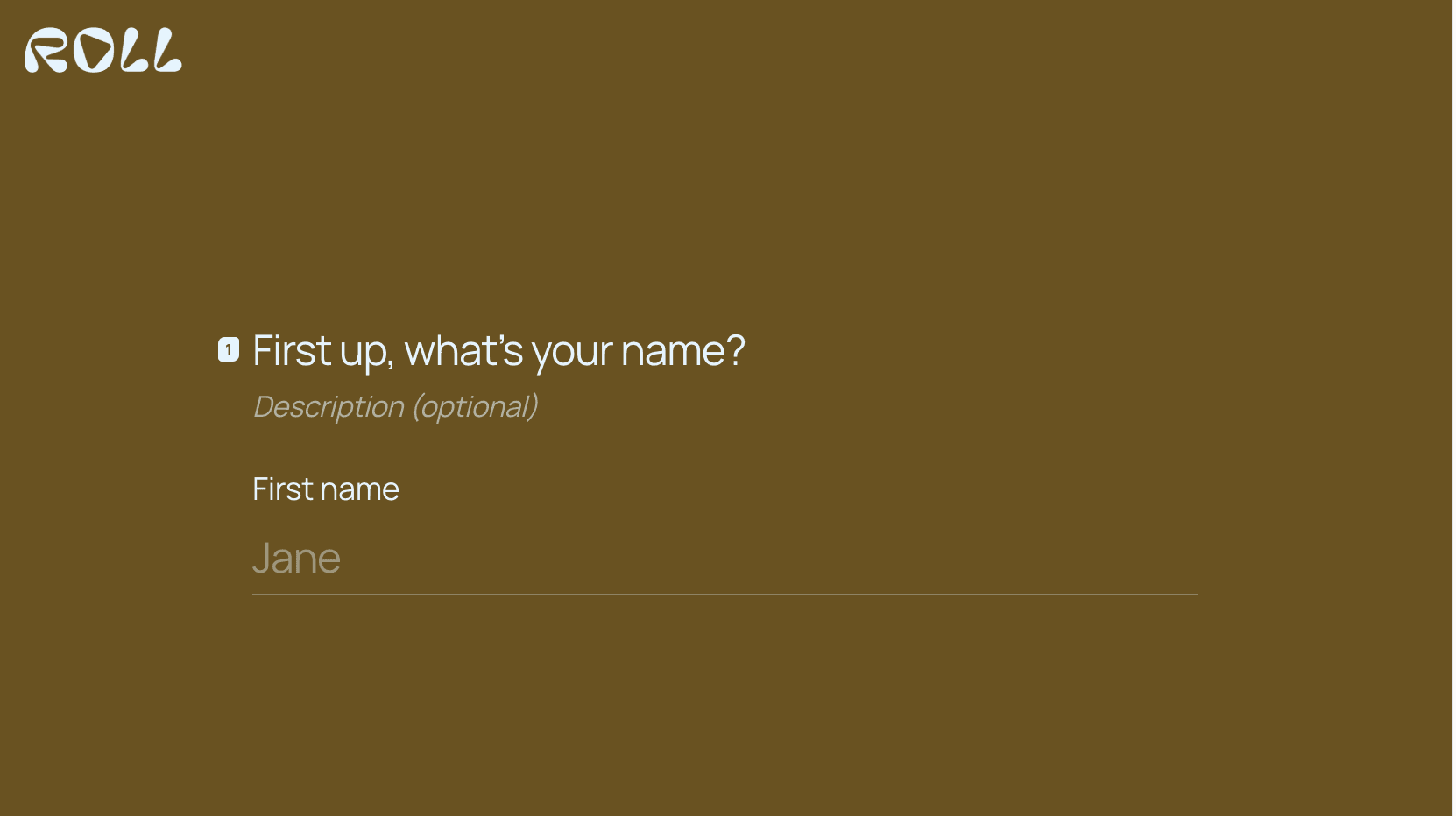
That single design decision drives everything else. Typeform's one-question-at-a-time format reduces the perceived effort of answering, which is why it performs well on customer-facing forms — the same mechanic behind why multi-step forms convert better than single-page ones. The cost is speed: someone who just wants to submit ten fields quickly will find Typeform slower than a plain form.
Jotform optimises for the opposite. It assumes the form is a step in a process — a submission that becomes a PDF, triggers an approval, or lands in a compliance workflow. Its 10,000+ templates cover a vast range of administrative use cases that Typeform simply doesn't address.
Typeform is best for forms your customers see. Jotform is best for forms your operations depend on.
Which is cheaper, Typeform or Jotform?
Jotform is cheaper up to roughly 2,500 responses per month. Above about 10,000, Typeform becomes cheaper. This surprises people, because Typeform has a reputation as the premium-priced option — and at low volume that reputation is deserved.
Here is the comparison at matched volumes, on list prices checked 17 August 2026:
The reason for the flip: Typeform's Business plan includes 10,000 responses at the same price it charges for 2,500, so everything between those points is absorbed into one tier. Jotform keeps stepping you up — Silver to Gold is $49 to $129.
Two caveats. Typeform's published prices vary by billing period and region, which is why the figures above are ranges rather than exact — verify against your own checkout. And Jotform meters submissions while Typeform meters responses; they count broadly the same thing but read each vendor's definition before committing at high volume.
The practical takeaway: if you're under 2,500/month, Jotform is meaningfully cheaper and the decision comes down to design. If you're above 10,000, Typeform's pricing is competitive and the "Typeform is expensive" heuristic no longer applies.
Which has the better form builder?
Typeform has the better editor for design; Jotform has the more powerful one for logic and output. Both are mature and neither will block a competent user.
Typeform's editor is opinionated. It gives you fewer choices and makes the result look good almost regardless of effort — genuinely valuable if nobody on your team is a designer.
Jotform's editor is a conventional drag-and-drop canvas with far more field types, deeper conditional logic, and native PDF generation. It will do things Typeform cannot, and it will let you build something ugly.
Typeform is best for teams without a designer. Jotform is best for teams with complex form logic or document output.
Which converts better?
Typeform generally converts better on customer-facing lead capture; Jotform is not usually competing for that job.
The mechanism is real: presenting one question at a time lowers the perceived cost of starting, and starting is most of the battle. That said, be sceptical of specific conversion percentages quoted in this category — most published figures come from vendor marketing with no methodology, and we won't repeat numbers we can't source.
What reliably matters more than the tool is sequencing: easiest question first, hardest in the middle, and a clear statement of what happens after submitting. Those rules decide outcomes far more than the logo on the form, and they're covered in our guide to high-converting landing pages.
When should you choose Typeform?
Choose Typeform when the form is part of the customer experience rather than an internal process. Specifically:
- The form is public-facing and reflects on your brand
- You have no designer and need it to look good by default
- You're running surveys or research where completion rate matters
- You're above 10,000 responses/month, where the pricing is competitive
- Conversational feel matters more than raw field count
Skip Typeform if you're between 1,000 and 2,500 responses/month and price-sensitive — that's where it's most expensive relative to Jotform. Our Typeform alternative breakdown covers the options if that's you.
When should you choose Jotform?
Choose Jotform when the form feeds a process. Specifically:
- Submissions need to become formatted PDF documents
- You need HIPAA features or similar compliance controls
- You want a template for a narrow, specific use case
- You're under 2,500 submissions/month and want the lower bill
- The form is internal or administrative, where design matters less
Skip Jotform if the form is your primary customer touchpoint and looks like it. Also skip it if your volume is growing fast — per-submission pricing means your bill rises with your success, which we work through in our Jotform alternatives comparison.
Typeform or Jotform for your specific situation
Most of this decision is situational, so here it is by scenario:
Two of those say neither, which is the honest answer rather than a sales line — and the reason is worth explaining.
When is neither Typeform nor Jotform the right choice?
Neither is the right choice when you're building a lead funnel rather than a form. This is a genuine category distinction, not a marketing one.
A form collects answers on one screen. A lead funnel sequences questions across multiple steps, branches based on answers, qualifies progressively, and is built to be finished on a phone by someone who arrived from an ad. Typeform's one-question-at-a-time format looks like this but isn't — it's a linear survey, not a branching qualification flow.
Three signs you're in funnel territory rather than form territory: you need different paths for different answers, most of your traffic arrives on mobile from paid ads, or you're running the same flow across multiple clients and need their data and branding kept separate. That last one in particular is something neither product has a concept of.
The mobile gap is the whole argument
Two numbers, both sourced, explain why this matters more than the Typeform-vs-Jotform choice does.
The first: mobile passed desktop and stayed there. Statcounter put mobile at 52.57% of global web traffic in July 2026, against 45.93% for desktop — and that's all web traffic averaged together. Paid social skews far harder than the average, because the ad was seen in a feed on a phone in the first place.
The second: forms convert worse on exactly that device. Zuko's benchmarking data, drawn from its aggregated customer base, shows view-to-completion at 47% on desktop against 42% on mobile (tablet 41%). Five points, consistently, across almost every industry it measures.
Put those together and the problem states itself. The majority of the people you're paying to reach arrive on the device where forms perform worst, and both Typeform and Jotform are desktop-shaped products with responsive layouts stretched over them. Responsive is not the same as mobile-first: one makes a desktop form survive a small screen, the other assumes the small screen was always the point.
Here is the same pair of forms on a phone:
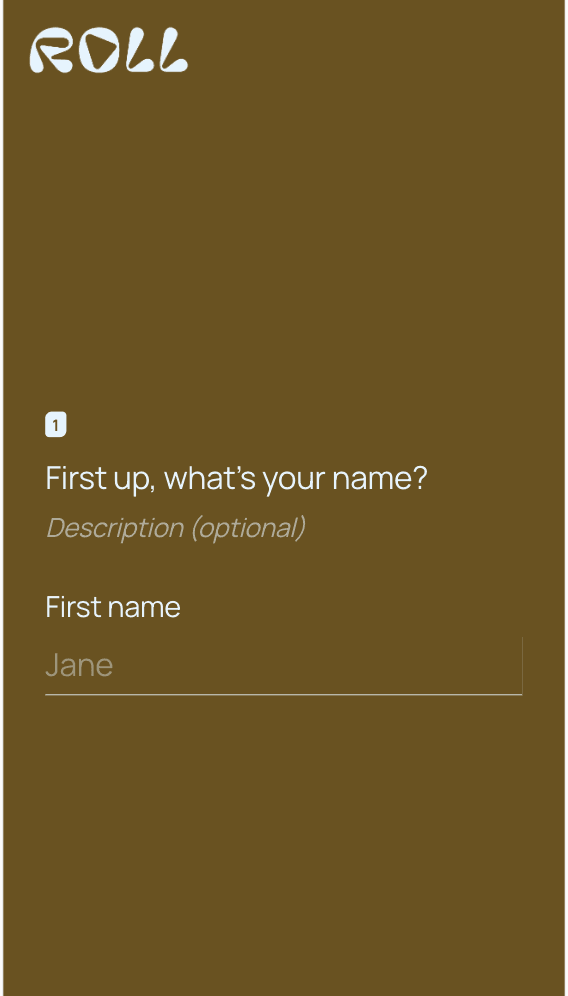
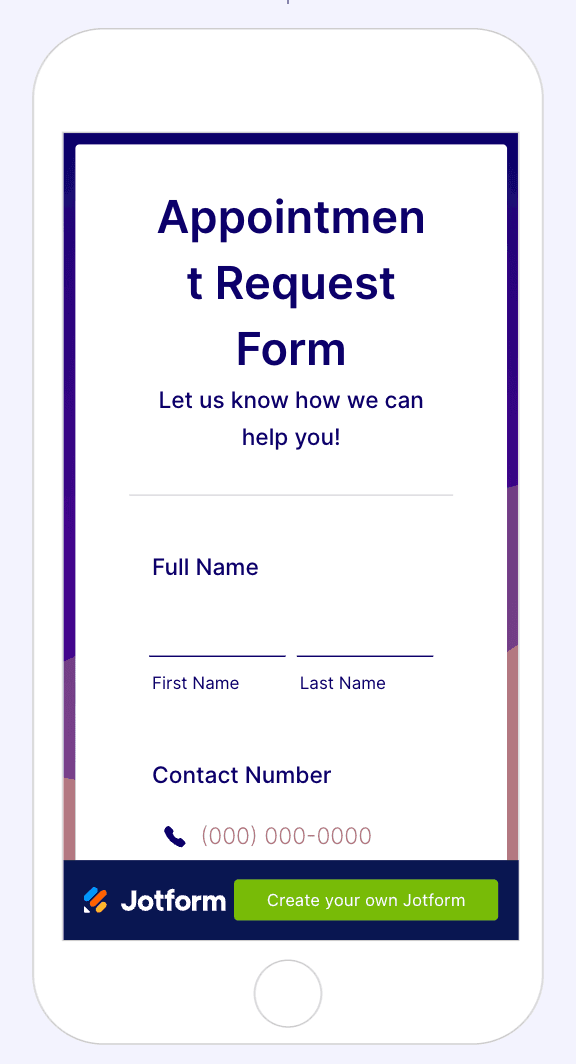
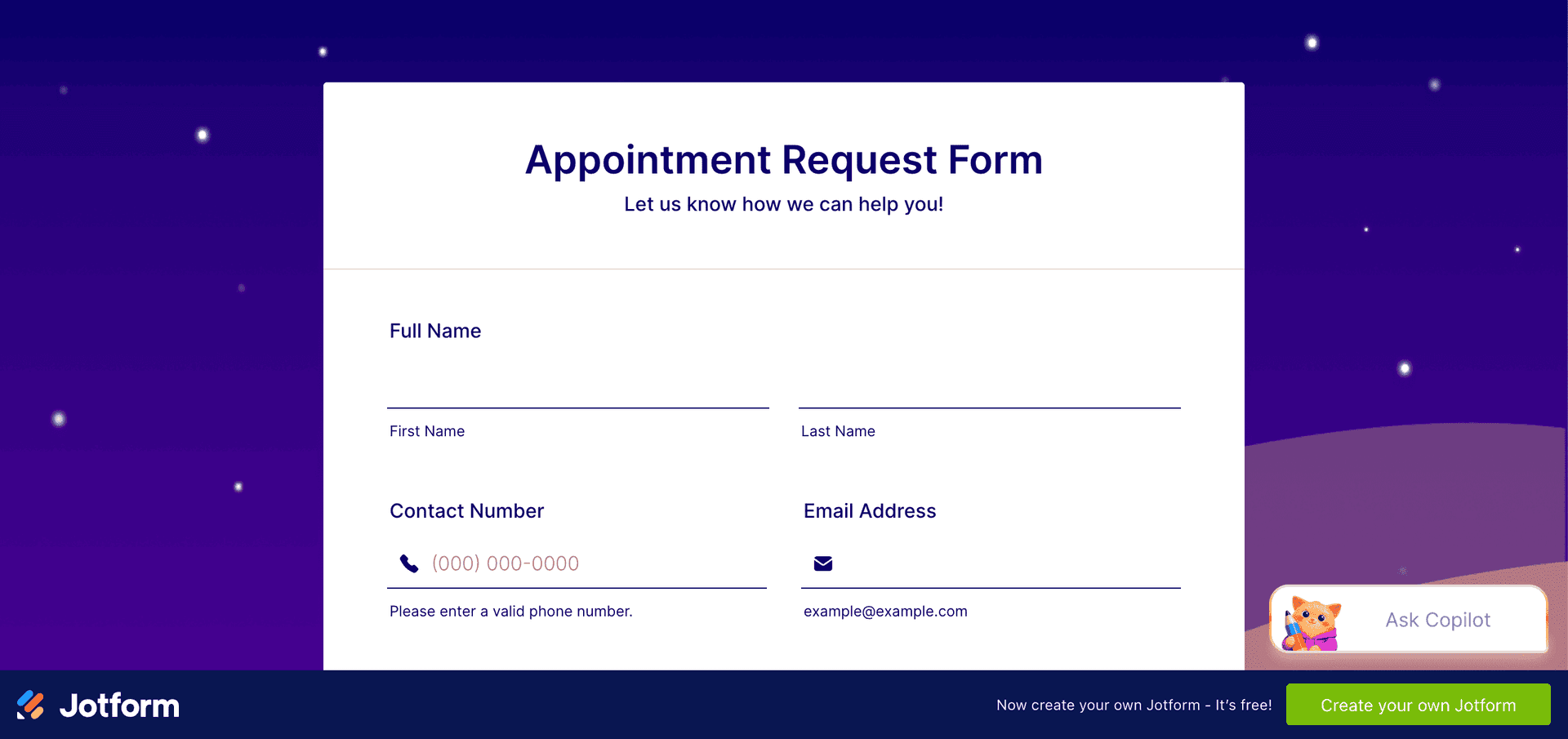
Typeform holds up better — it's the one thing its format is genuinely good at. But neither screen was designed for the phone first. Jotform's is the clearer failure: the heading wraps mid-word, first and last name stay side by side in columns sized for a desktop, and the free plan spends the bottom of the viewport advertising Jotform to your lead.
What a mobile-first funnel builder adds

Compare that with the Jotform appointment form above. Same job, opposite starting point: the questions are answered by tapping rather than typing, the progress bar tells you how much is left, and contact details are asked at step 8 rather than field one — by which point the person has already invested eight taps and is far more likely to finish.
This is the category CueFully is built for, and the difference isn't only the editor. A funnel that gets built beautifully and then loses the lead somewhere between submission and follow-up hasn't done its job, so the surrounding pieces are part of the product rather than integrations you assemble afterwards:
- App-like, mobile-first funnels. Designed for the phone screen first, with sub-second load times on published funnels — the window where paid traffic is either kept or lost.
- Leads stored and searchable in-product. Every submission is a record with its answers, file uploads and source attached, not a CSV export you have to go and fetch.
- Session-level analytics. Not just how many finished: where each session dropped, which step lost them, what people actually answered, and which source and device they came in on. Step-by-step drop-off is the only reliable way to fix a multi-step flow.
- An isolated workspace per client. Funnels, leads and brand kits stay separated by client, with a reusable brand kit so colours and fonts are set once. Neither form builder has a concept of this.
- Ad platform tracking that closes the loop. A Meta pixel plus server-side Conversions API, so conversions report back to the ad account that paid for them — plus Google Sheets delivery and webhooks for whatever else you run.
That's a different tool for a different job, not a better form builder. If what you need really is a form — a survey, an intake document, a registration — use one of the two above; they're both good at it. If you're paying for mobile traffic and the form is where it dies, you're solving the wrong problem by comparing form builders.
FAQ
Is Typeform or Jotform better?
Typeform is better for customer-facing forms where design and completion rate matter. Jotform is better for high-volume data collection, document workflows and compliance requirements. Typeform has the superior interface; Jotform has more capability and a larger template library.
Is Typeform more expensive than Jotform?
Only up to about 2,500 responses per month. At 1,000 responses Typeform's Plus plan is around $50/month against Jotform's Bronze at $39. At 10,000 responses the position reverses: Typeform Business is roughly $83–99/month while Jotform Gold is $129/month. Pricing checked 17 August 2026.
Does Jotform or Typeform have a better free plan?
Jotform's free plan is more usable for most people. Both cap at 100 responses or submissions per month, but Jotform allows 5 active forms while Typeform's free tier is limited to a single seat with basic customisation. Neither free tier suits production lead capture at any real volume.
Can Typeform generate PDFs like Jotform?
No. Native PDF generation from submissions is a Jotform feature with no direct Typeform equivalent. If your process ends in a formatted, printable or signable document, Jotform is the correct choice and this alone should decide it.
Which is better for lead generation, Typeform or Jotform?
Typeform generally performs better for customer-facing lead capture because its one-question-at-a-time format lowers the effort of starting. However, if you need branching qualification paths, mobile-first design for paid traffic, or separate workspaces per client, both are the wrong category and you want a funnel builder instead.
Is Typeform or Jotform better for HIPAA compliance?
Jotform. It offers HIPAA features on higher tiers, while Typeform restricts HIPAA compliance to Enterprise plans. For healthcare and adjacent industries, Jotform is usually both the cheaper and more straightforward option.
Can I switch from Typeform to Jotform, or the other way round?
There is no one-click migration between them. Most teams rebuild their highest-traffic forms manually and export historical responses as CSV before cancelling. The rebuild is usually faster than expected, since most accounts have only a handful of forms carrying real volume even when they contain dozens.
Typeform and Jotform pricing was checked on 17 August 2026 from each vendor's public pricing page. Typeform's published prices vary by billing period and region, so figures are given as ranges. Vendors change prices without notice — confirm on the vendor's own site before purchasing. Device traffic share is from Statcounter Global Stats, July 2026. Form completion rates by device are from Zuko's aggregated benchmarking data.
Build from the guide
Start with the Appointment Booking template
Start from a proven mobile-first flow, customize it for your client, and publish a funnel that captures qualified leads without adding developer work.